
AI Agents for E-Commerce
AvaritCall gives online stores AI voice agents that answer customer calls and make follow-up calls along the order journey. They answer product questions before a purchase, call back shoppers who left checkout unfinished, share shipping updates and take return and exchange requests.

Sample call
- Caller
- My jacket came today, but the medium is too small. Can I swap it for a large?
- AI agent
- Yes. Exchanges are open for 30 days, and the order shows as delivered this morning. I've logged a large for order 40729.
- Caller
- Great, thanks.
Exchange Request Logged
- Order
- #40729
- Store status
- Delivered, updated 9:40 AM today
- Exchange
- Medium to large
Next step: Returns team approves the exchange and emails the return steps
Hear How AI Handles Checkout, Delivery, and Return Calls
Pick a scenario to read the call. Each one shows what the shopper asked, how the call ended and what happens next.
Outbound call
Incomplete Checkout Follow-Up
Result
Checkout Question Answered
- Customer
- Dana Brooks
- Question
- Installment options
- Checkout link
- Sent by email
- Purchase
- Marked only when the store confirms it
Next step: Store system shows whether the order was placed
The calls, stores, customers and orders are made up. Each store sets the information the agent may share, its verification steps and when a call goes to staff.
Inbound call
Delayed Shipment Inquiry
Result
Shipping Review Requested
- Order
- #38215
- Last carrier update
- Saturday, left the sorting center
- Expected delivery
- Monday, missed
- Sent to
- Logistics team
Next step: Logistics checks with the carrier and emails the customer
The calls, stores, customers and orders are made up. Each store sets the information the agent may share, its verification steps and when a call goes to staff.
Inbound call
Wrong Size Exchange
Result
Exchange Request Logged
- Order
- #41602
- Item
- Trail running shoes
- Exchange
- Size 9 to size 9.5
- Condition
- Unworn, original box
Next step: Returns team approves and sends the return steps
The calls, stores, customers and orders are made up. Each store sets the information the agent may share, its verification steps and when a call goes to staff.
Support Online Shoppers Before and After They Order
Product, Stock, and Delivery Questions
Product details, size options and delivery terms come from the information your store approves. When your catalog is connected, the agent can also share current stock during the call.
AI phone agent for retail storesAbandoned Cart and Checkout Follow-Ups
Shoppers who left items in the cart or stopped at checkout, and who agreed to be contacted, get a call at the time your store sets. The agent finds out where they got stuck and passes anything that needs support to the right team.
Cash-on-Delivery Order Confirmation
For cash-on-delivery orders, the agent runs your verification steps, then saves the customer's confirmation or change request. Orders that need a check before they ship go to your operations team.
Batch callingOrder Status and Shipping Updates
Statuses like preparing, shipped or delivered are read from your connected order or shipping system. If an order shows as delivered but never arrived, the agent opens a request for logistics to look into it.
AI agents for logisticsReturn, Exchange, and Refund Requests
Callers hear your return window, exchange terms and how to send an item back, and their request is logged. Approvals and refunds stay with your store's authorized team.
Post-Delivery Feedback and Product Issues
From a list your store provides, delivered orders can get a short feedback call. Reports of a damaged or missing item go to support with the order reference and the customer's own description.
Inbound call center solutions
Set Call Rules by Order Status and Customer Request
Build
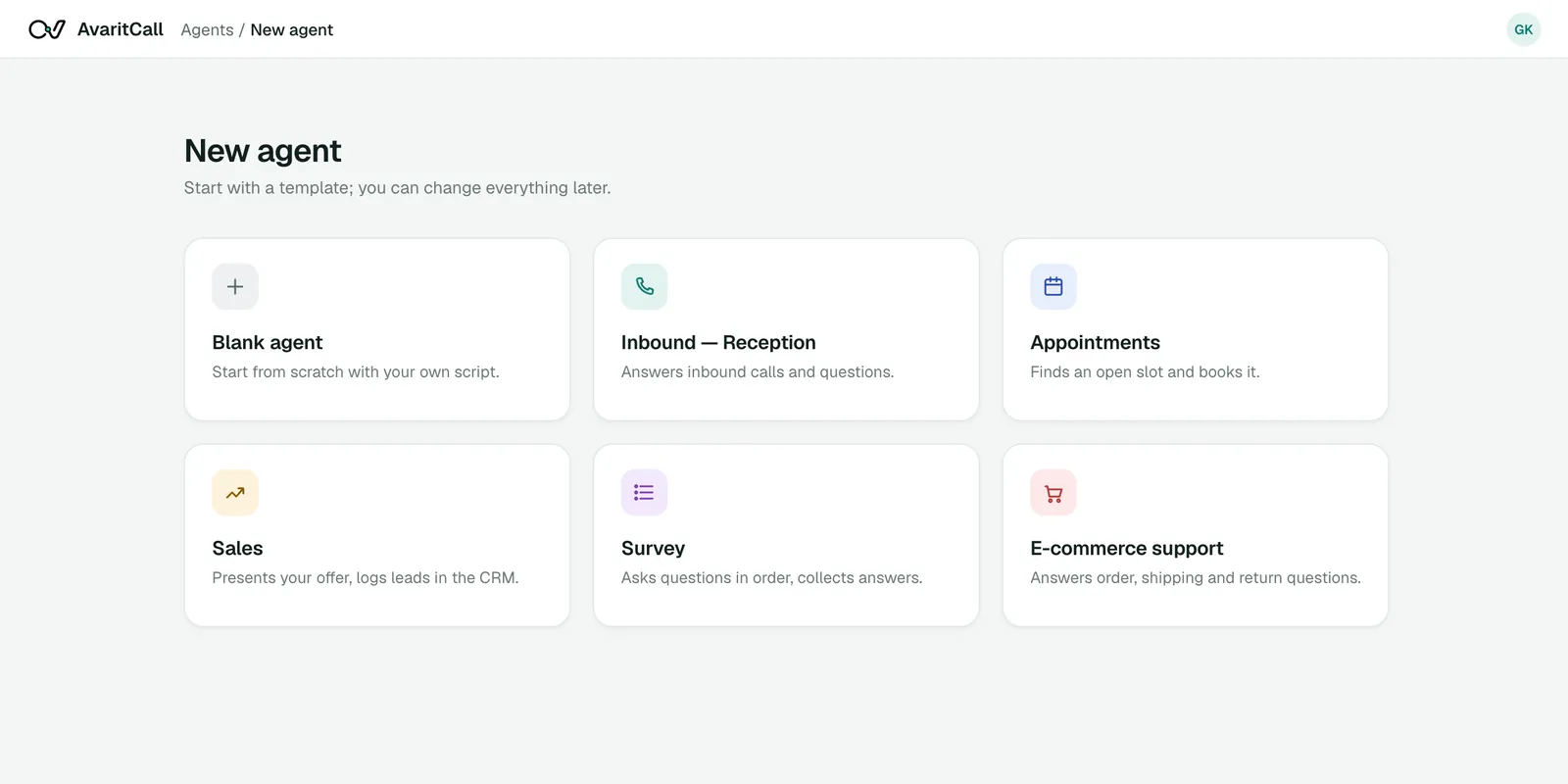
Build a Flow for Each Order Request
Product questions, order tracking and return requests each get their own flow. For each one, choose the information the agent answers from, the verification it runs before order details and when it transfers.
- Product pages, policies and catalog files as the knowledge source
- Verification before any order or address detail
- Transfer conditions for logistics, support and refunds
- Fields saved on each call
Deploy
Cover Busy Sales Periods and Run Follow-Up Lists
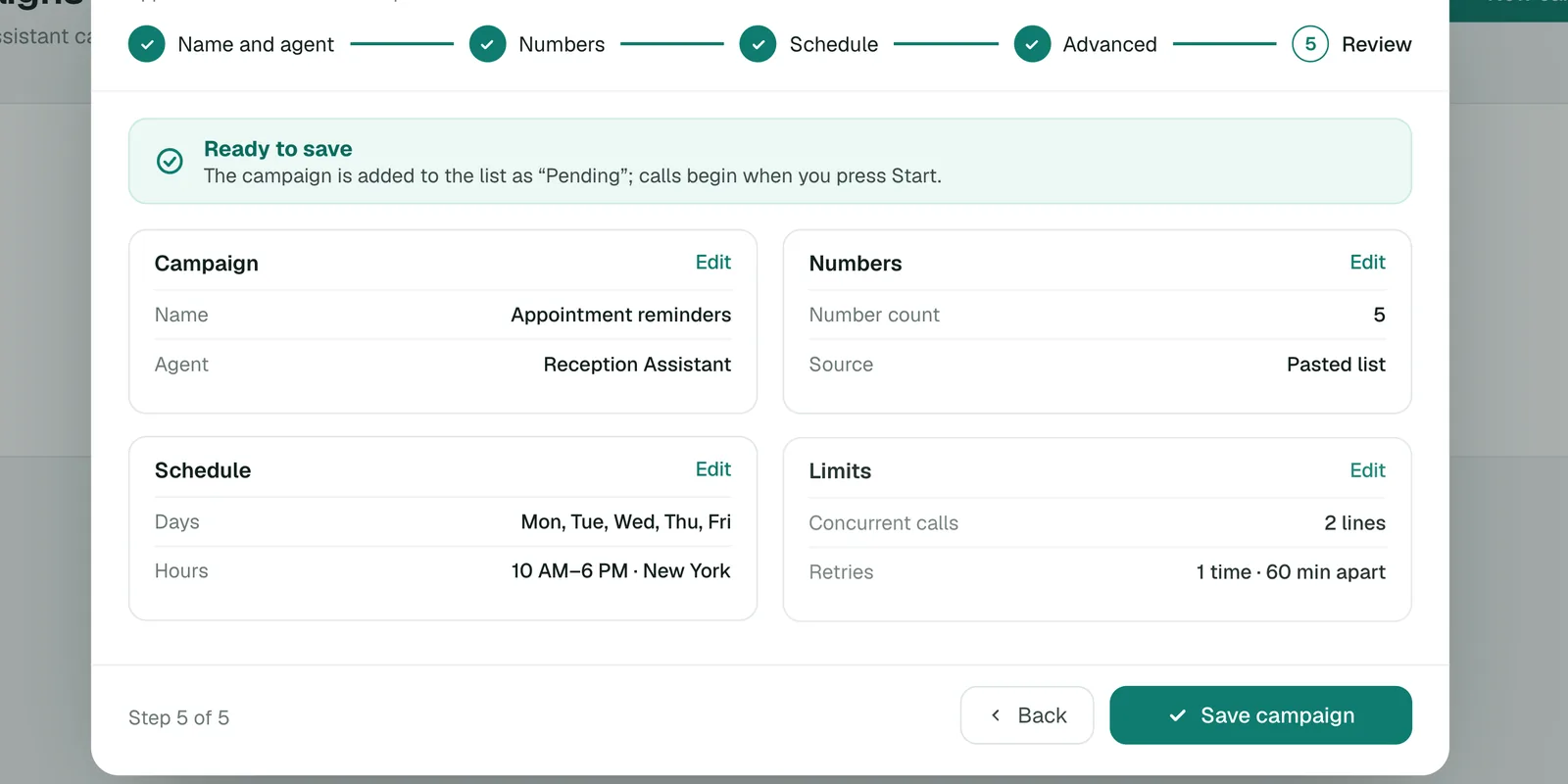
During a big sale, support calls that would wait in a queue can go to the agent. Cart follow-ups and cash-on-delivery confirmations run as outbound lists with their own hours and retries.
- Support line connected over SIP
- All calls, overflow or after-hours calls
- Calling days, hours and time zone for each list
- A retry count from 0 to 5 and the gap between attempts
Monitor
See Which Orders Need Your Team
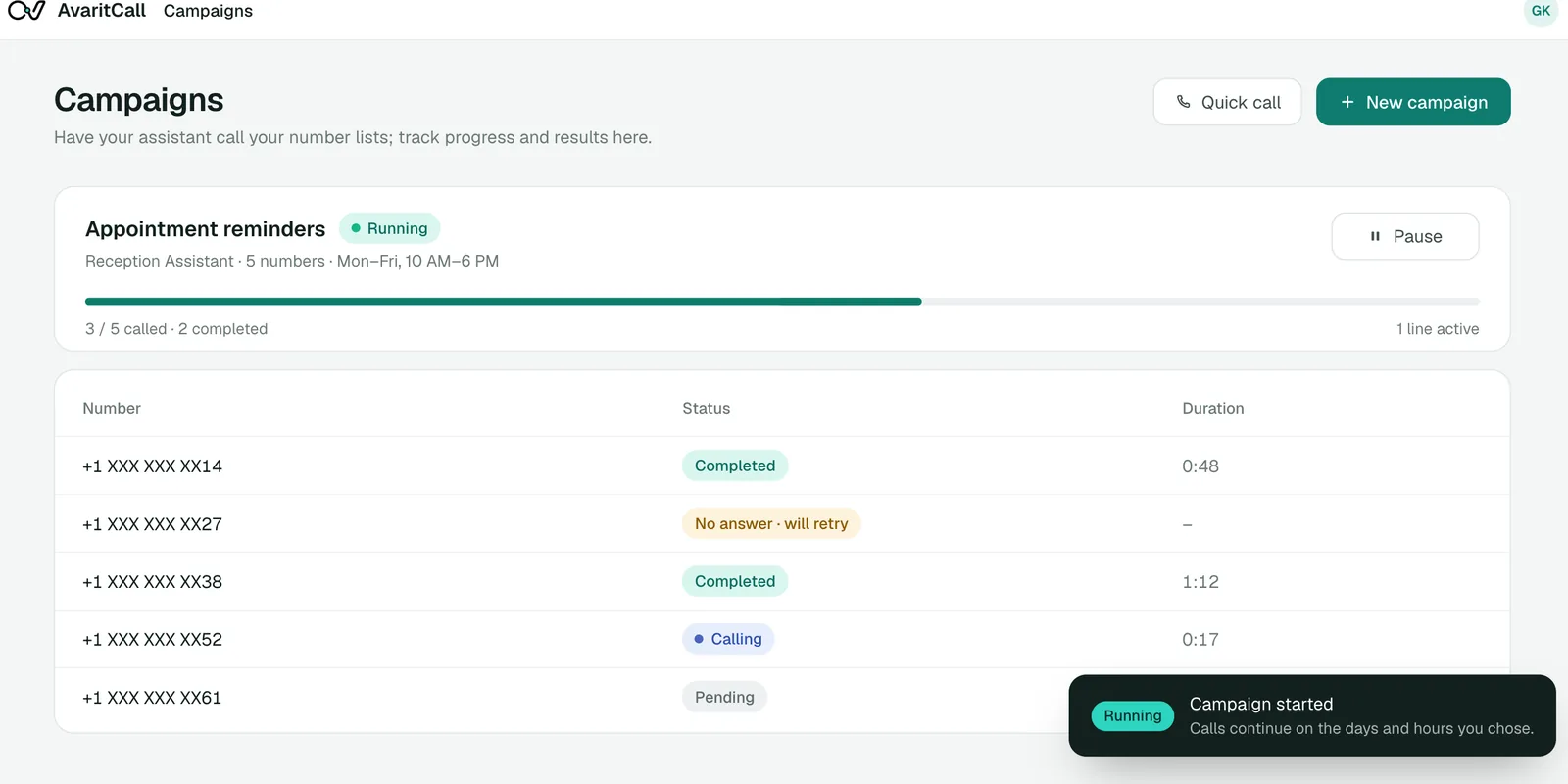
Open any call to see the outcome, the summary and the transcript. A completed purchase or an issued refund shows only when your store system can confirm it.
- Shipping questions answered
- Orders the customer confirmed
- Requests waiting for team review
- Pending callbacks
Protect Order Details and Give Staff the Context to Act
Verify the Customer Before Sharing Order Details
Your verification steps come first, before the agent talks about what's in an order, the delivery address or a customer's return status. The agent never takes card details on the phone. For payments, it sends the customer to your store's official checkout page. Only team members you give access to can see call records, and transcripts are deleted automatically after a set retention period.
Route Delivery, Product, and Refund Exceptions
A lost parcel goes to logistics, a damaged or wrong item to customer support and a refund dispute to the team allowed to decide on it. If nobody answers, a callback request is saved with the order reference, the latest store status and the customer's words.
Example handoff
Sent to Logistics Review
- Order ref.
- #38215
- Store status
- Delivered, updated Tuesday 4:12 PM
- Customer says
- Parcel never arrived at the door
- Expected action
- Logistics opens a carrier claim
Connect Your Online Store, Shipping Data, and Support Tools
Each connection below says what it can do today. Store connections are in beta, and other systems connect through their API.
Beta
Store & Order Data
 Shopify (beta)
 WooCommerce (beta)
- ikas (beta)
- Knowledge base (PDF, web pages, CSV)
Order status lookups for Shopify, ikas and WooCommerce are in beta. Which order and product fields the agent can read depends on the connection. Product details can also come from the files and pages in the agent's knowledge base.
Set up by our team
Shipping & Support Systems
- AvaritCall CRM
- Freshdesk (beta)
- Custom HTTP tools
- Webhooks
Reading the latest carrier update, opening a logistics review or writing the call outcome to your help desk goes through that software's API. Our team looks at what each one allows for your setup.
Ready
Phone & Outbound Lists
- Twilio
- Telnyx
- Plivo
- Any SIP trunk or PBX
- Contact list upload
Connect your existing support line over SIP and transfer calls to the right team. Follow-up calls start from a list your store prepares, and customers who ask not to be called are skipped.
Choose Your First E-Commerce Call Workflow
Start with one flow, such as order tracking calls or cash-on-delivery confirmations.
Connect Your Phone Line and Store Data
Connect your support line over SIP and your store through its connection, or upload an order list.
Set Verification and Support Handoff Rules
Choose the questions asked before order details and the team that takes each kind of exception.
Test Sample Orders and Launch
Play a customer with a few sample orders in your browser, then go live.
| Connection | Read Order Status | Check Shipment Updates | Log Support Requests | Start Follow-Up Calls |
|---|---|---|---|---|
| Contact list upload | From the list fields | From the list fields | Yes, in the AvaritCall CRM | Yes |
| Shopify, ikas or WooCommerce (beta) | Yes | Tracking status the store holds | Yes, in the AvaritCall CRM | No |
| Custom API integration | Depends on the API | Depends on the API | Depends on the API | Yes, through the REST API |
AI Agents for E-Commerce Pricing
You pay for talk minutes on the calls your agents answer and make, so busy sale weeks cost more only because there are more calls.
$0.08
per talk minute, billed per second
Example calculation
- 45-second call
- $0.06
- 2 min 30 s call
- $0.20
- 5-minute call
- $0.40
- Pay as you go, billed per second of talk time
- Ringing and unanswered calls are free
- Outbound campaigns run 5 concurrent calls per agent by default
- Emails and WhatsApp messages you choose to send are billed per message
- A custom connection to your store or support systems is scoped with you
Frequently Asked Questions
What can AI agents do for e-commerce businesses?
They answer customer calls and make follow-up calls for your store. Common jobs are product and delivery questions, checkout follow-ups, cash-on-delivery confirmations, order tracking and return or exchange requests. Anything that needs a person goes to the right team with the call details.
Can an AI agent answer product and stock questions?
Yes. Product answers come from the pages, policies and catalog files you add to the agent's knowledge base. Current stock can be shared when your catalog is connected. If the agent can't confirm the data is current, it says so and offers a callback.
Can it follow up on abandoned carts or incomplete checkouts?
Yes, for shoppers who agreed to be contacted. Upload the list or send it through the API, and the agent calls at the times you set, finds out what stopped the order and can email the link back to checkout. The purchase counts only when your store shows the order.
Can it confirm cash-on-delivery orders by phone?
Yes. The agent runs your verification steps, then saves whether the customer confirms the order, wants to change it or wants to cancel it. Orders that need a check before shipping go to your operations team.
Can it check order status and shipment updates?
Yes, when your store is connected. Order status lookups for Shopify, ikas and WooCommerce are in beta, and other order or shipping systems connect through their API. If there's no new delivery date, the agent opens a request for your logistics team.
Can it take return and exchange requests or check refund status?
It takes the request and explains your return window and exchange terms. Approving a return and issuing a refund stay with your team. Refund status can be shared when your store system makes it available through the connection.
What happens if a customer reports a missing or damaged item?
The agent saves the order reference, what the customer describes and the latest status in your store system. A missing parcel goes to logistics and a damaged item to customer support, by transfer or as a callback request.
Can it connect to Shopify, ikas, WooCommerce, or our support system?
Shopify, ikas and WooCommerce order lookups are in beta. A support system or help desk connects through its API with a custom tool, and what it can read or write depends on that API. Call outcomes can also go out through webhooks.
How much do AI agents for e-commerce cost?
It's $0.08 per talk minute, billed per second, so an order support call of 2 minutes 30 seconds costs $0.20. Messages you send are billed per message, and you start with $5 in credit with no card required. A store-specific system connection is scoped separately.
Start With the Order Questions Your Support Team Gets Every Day
Pick one store and its order and shipping calls to begin. At the end of the day, your team sees the order whose shipping status was explained on the call, the delay passed to logistics and the exchange request waiting for a callback from support.