
AI Agents for Real Estate
AvaritCall gives real estate offices and new development sales teams AI voice agents that answer incoming calls and call new inquiries back by phone. A listing inquiry moves from the first call to a booked viewing and a CRM record your agent can pick up.

Sample call
- AI agent
- You asked about the two-bedroom on Maple Street. Are you looking to buy or rent?
- Caller
- Buy. Can I see it this weekend?
- AI agent
- Saturday at 11 AM is open. I've booked it, and Dana from our team will meet you there.
Viewing Booked
- Listing ref.
- MS-2214, two-bedroom apartment
- Buyer wants
- Two bedrooms, near transit
- Agent
- Dana Ruiz
Next step: Dana sees the viewing and the buyer's notes in the CRM
Hear How AI Handles Buyer, Seller, and Viewing Calls
Pick a scenario to read the call. Each one shows the request, how the call ends and what your agent does next.
Outbound call
New Listing Inquiry to Booked Viewing
Result
Viewing Booked
- Buyer
- Marcus Lee
- Listing ref.
- MS-2214
- Move-in timing
- By spring
- Viewing
- Saturday, 11 AM
Next step: Dana gets the viewing and the buyer's notes in the CRM
The calls, people, listings and offices are made up. Each office sets the listing details the agent may share and when a call goes to an agent.
Inbound call
Seller Valuation Request
Result
Valuation Consultation Requested
- Owner
- Helen Brooks
- Property
- Three-bedroom townhouse, Cedar Lane
- Planned sale
- In two to three months
- Assigned to
- Listing team
Next step: A listing agent calls Helen to set the valuation visit
The calls, people, listings and offices are made up. Each office sets the listing details the agent may share and when a call goes to an agent.
Outbound call
Post-Viewing Follow-Up
Result
Buyer Preferences Updated
- Buyer
- Priya Nair
- Viewed
- OA-1187, two-bedroom
- Now looking for
- Three bedrooms, same area
- Task
- Agent sends alternative listings
Next step: Agent picks other listings from the updated notes
The calls, people, listings and offices are made up. Each office sets the listing details the agent may share and when a call goes to an agent.
Manage Property Inquiries From First Contact to After the Viewing
Follow Up on Website and Property Portal Inquiries
New inquiries from your website, a development form or a connected listing channel get a callback. Your agent sees the call outcome together with where the lead came from and which listing caught their eye.
AI lead qualificationCapture Buyer and Renter Preferences
Area, budget range, property type and when they want to move or buy are saved on the call. If a buyer shifts to another area or budget, the update goes into the record your agent uses on the next call.
Answer Questions About Active Listings
Price, features and viewing availability come from the information your office approves or from your connected listing system. If the current status of a listing can't be confirmed, the agent asks your team to call back.
Book and Confirm Property Viewings
Open viewing times come from your connected calendar, and the caller hears the confirmed time. When an owner, tenant or agent has to approve a viewing, the preferred time is saved and sent for approval.
AI appointment schedulingCapture Seller and Valuation Inquiries
Owners who want to sell or rent out a property leave their contact details, the property type, its location and their timing. The valuation request goes to the listing agent who covers that area.
Follow Up After a Property Viewing
A follow-up call after the viewing records how interested the buyer is and anything that changed. Requests for a second viewing, other listings or an offer conversation go to the agent.
Set Follow-Up and Routing Rules by Listing, Area, and Team
Build
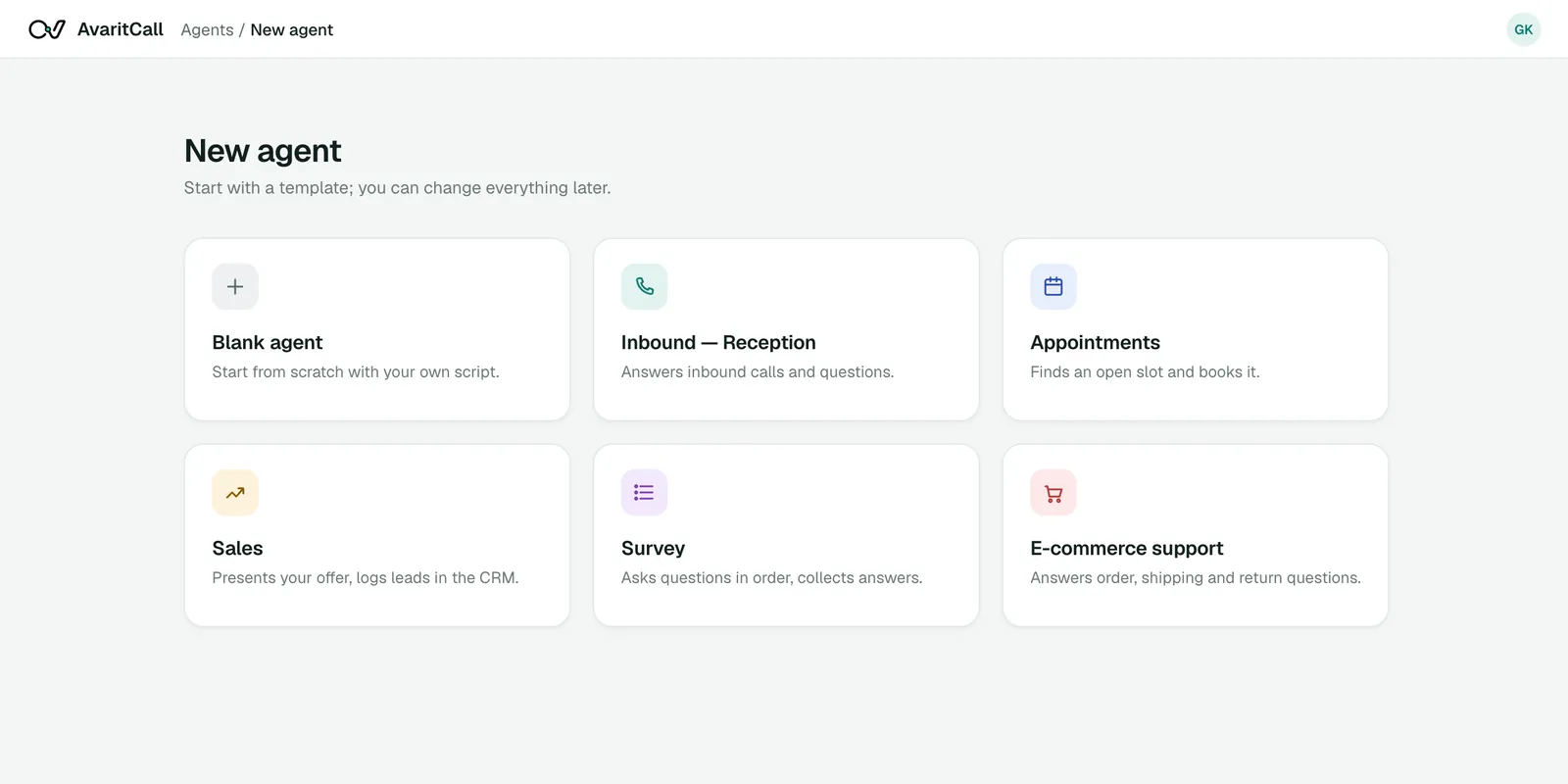
Build Questions for Buyers, Renters, and Owners
Choose what the agent asks buyers, renters and owners. Then decide which agent takes over each inquiry by listing, area or development.
- Approved listing details as the knowledge source
- Separate questions for buyers, renters and sellers
- Agent assignment by listing, area or project
- Fields saved on each call
Deploy
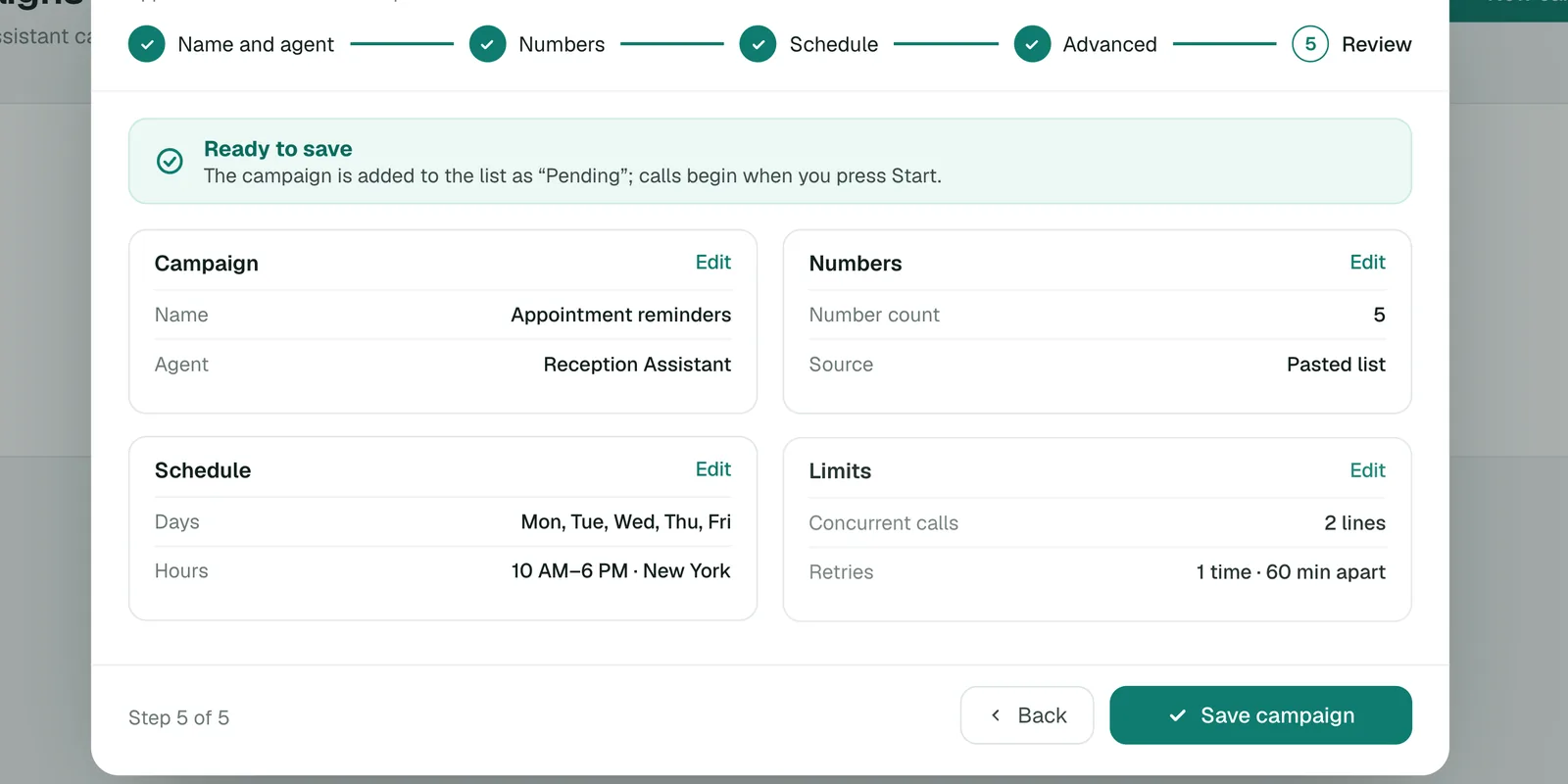
Run Listing Lines and Follow-Up Calls
Connect your office line for listing calls and set up follow-up calls for new inquiries. If your form connection supports it, a new inquiry joins the follow-up flow on its own.
- Office line connected over SIP
- Calling days, hours and time zone
- A retry count from 0 to 5 and the gap between attempts
- People who ask not to be called are marked do-not-call automatically
Monitor
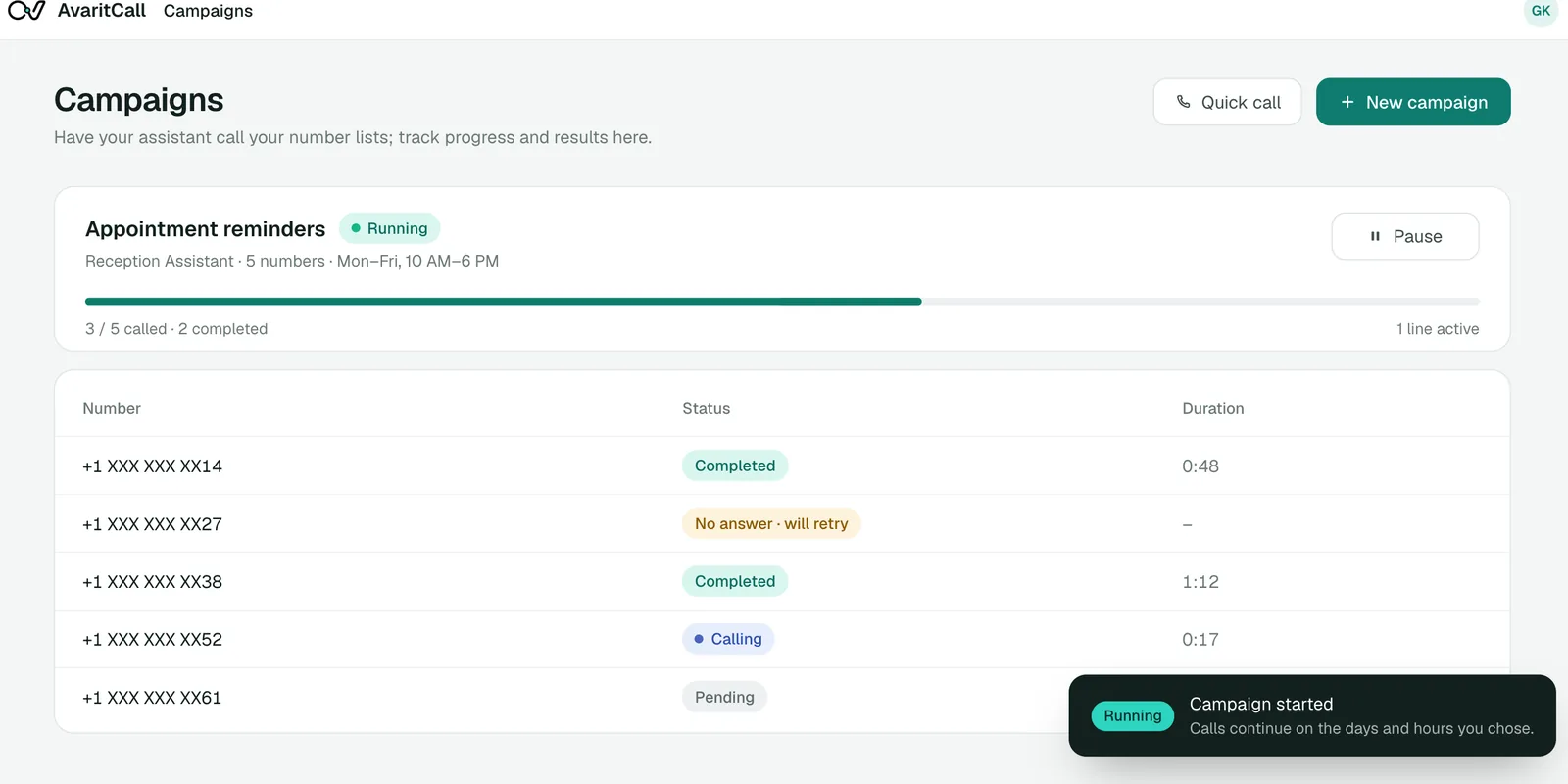
See Every Inquiry and Viewing in One Place
Check the outcome of each call and what your team still has to do.
- Inquiries that got a first call
- Viewings confirmed in the calendar
- Viewings waiting for approval
- Records waiting for an agent callback
Give Agents the Context to Take Over the Conversation
Control Which Listing and Customer Details Are Shared
Your office decides which listing details the agent may share on a call. Internal notes, such as the owner's contact details or how to access a property for a showing, stay in the record only your authorized agents can see.
Route Offers, Negotiations, and Viewing Exceptions
Price negotiations, written offers and private showing requests go to the right agent. If that agent isn't free, a callback request is saved with the listing reference, the buyer's criteria and a short summary of the call.
Example handoff
Agent Callback Requested
- Listing ref.
- MS-2214
- Buyer criteria
- Two bedrooms, near transit, by spring
- Call summary
- Wants to make an offer after Saturday's viewing
- Agent to do
- Call back to discuss the offer
Connect Your Listing Data, CRM, and Viewing Calendar
Each connection below says what it can do today. Listing portals and MLS feeds depend on the access your system gives, and there's no ready-made connector for them.
Ready
Phone & Lead Sources
- Twilio
- Telnyx
- Plivo
- Any SIP trunk or PBX
- Contact list upload
Connect your existing office line over SIP. Web form inquiries join the follow-up flow through supported connections, or you can start from an uploaded list.
Ready
CRM & Viewing Calendar
 Cal.com (beta)
- AvaritCall calendar
- AvaritCall CRM
- Webhooks
Viewings are booked in the AvaritCall calendar or Cal.com (beta), and each call summary is saved to the contact in the AvaritCall CRM. Another CRM connects through its API and webhooks.
Set up by our team
Listing Data & Property Platforms
Approved listing details can come from your knowledge base, or be read from your listing system through its API. Our team looks at portal and MLS connections based on the access your system allows.
Choose Your First Lead Source
Start with one source, such as the web form for a single listing or development.
Connect Your Phone Line, CRM, and Calendar
Connect your office line over SIP and the calendar your agents use for viewings.
Set Listing, Booking, and Handoff Rules
Add your approved listing details, viewing rules and which agent takes each kind of request.
Test Sample Calls and Launch
Play a buyer or an owner in your browser, then go live.
| Connection | Import New Inquiries | Read Listing Details | Book a Viewing | Log Call Outcomes |
|---|---|---|---|---|
| Web form and phone line setup | Yes, through supported connections or a list | From your knowledge base | No | Yes, in the AvaritCall CRM |
| AvaritCall CRM and calendar (Cal.com in beta) | No | No | Yes | Yes |
| Custom API connection to your listing system | Depends on the API | Depends on the API | No | Depends on the API |
AI Agents for Real Estate Pricing
You pay for talk minutes on the calls your agents answer and make. There are no plans with bundled minutes and no overage fees.
$0.08
per talk minute, billed per second
Example calculation
- 45-second call
- $0.06
- 2 min 30 s call
- $0.20
- 5-minute call
- $0.40
- Pay as you go, billed per second of talk time
- Ringing and unanswered calls are free
- Emails and WhatsApp messages you choose to send are billed per message
- A custom connection to your listing system is scoped with you
Frequently Asked Questions
What can AI agents do for real estate teams?
They answer listing calls and call new inquiries back for you. Common jobs are web inquiry follow-ups, buyer and renter preferences, viewing bookings, seller valuation requests and post-viewing calls, and anything that needs an agent goes to the right person.
Can an AI agent call leads from our website or property portal?
Yes. Inquiries can join the follow-up flow through supported connections, or you can upload a list. Portal connections depend on the access your system gives, and our team checks them for your setup.
Can it capture buyer and renter preferences before a viewing?
Yes. The agent asks the questions you set, such as area, budget, property type and timing. The answers are saved to the call so your agent walks into the viewing knowing what the buyer wants.
Where does it get current listing prices and availability?
From the listing information your office approves, or from your listing system if it's connected through its API. If the agent can't confirm that a listing is still available, it asks your team to call back instead of guessing.
Can it book property viewings in our team's calendar?
Yes. Viewings are booked in the AvaritCall calendar or Cal.com (beta), and the caller hears the confirmed time. Viewings that need an owner or tenant to agree are saved as a request and sent for approval.
Can it handle seller inquiries and valuation requests?
Yes. It records the owner's contact details, the property type, its location and when they plan to sell or rent. The valuation request then goes to the listing agent who covers that area.
Can it follow up after a viewing and update our CRM?
Yes. A follow-up call records the buyer's interest and any new criteria, and the summary is saved to the contact in the AvaritCall CRM. Another CRM can receive the outcome through its API or webhooks.
What happens if a client wants to make an offer or negotiate?
The call goes to the agent handling that listing. If the agent isn't free, a callback request is saved with the listing reference, the buyer's criteria and the call summary. The AI agent doesn't negotiate or accept offers.
How much do AI agents for real estate cost?
It's $0.08 per talk minute, billed per second, so a viewing call of 2 minutes 30 seconds costs $0.20. Messages you send are billed per message, and you start with $5 in credit with no card required. A custom connection to your listing system is scoped separately.
Start With the Next Inquiries for One Listing or Project
Pick one listing or one development form and let the agent call its next inquiries. At the end of the day, your team can see which buyer has a viewing booked, whose criteria changed and who is waiting for an agent to call back.