
AI Agents for BPOs
AvaritCall is an AI voice agent platform that helps BPOs answer inbound calls and run outbound campaigns on behalf of their client brands. For each campaign, you set what the agent says, which numbers calls transfer to and which call details get saved.

Sample call
- Caller
- My blender arrived with a cracked jug.
- AI agent
- Sorry about that. I've opened a ticket for order 61907, and support will email you about a replacement.
Support Ticket Created
- Campaign
- Home goods store, inbound support
- Issue
- Item arrived damaged
- Ticket
- Created in the client's help desk
Next step: Client's support team handles the replacement
Hear How AI Agents Handle Calls Across Client Campaigns
Pick a scenario to read the call. Each one belongs to a different client campaign and shows the record the right team sees afterward.
Inbound call
E-commerce Support
Result
Support Ticket Created
- Campaign
- Brightnest Home, inbound support
- Order
- #58213
- Issue
- Lamp base cracked on arrival
- Ticket
- Opened in the connected help desk
Next step: Client's support team arranges the replacement
The calls, clients and customers are made up. Each campaign has its own script, its own transfer numbers and its own outcome fields.
Outbound call
Sales Lead Qualification
Result
Qualified Lead Transferred
- Campaign
- Summit Solar, quote follow-up
- Property
- Owned home, newer roof
- Timing
- Before summer
- Transfer
- Connected to the client's sales team
Next step: Sales advisor picks up with the call summary
The calls, clients and customers are made up. Each campaign has its own script, its own transfer numbers and its own outcome fields.
Outbound call
Payment Follow-Up
Result
Promise to Pay Recorded
- Campaign
- Clearline Internet, past-due billing
- Amount
- $74
- Promised date
- The 28th
- Team follow-up
- Check the account on the 29th
Next step: Client's billing team sees the promise and the follow-up date
The calls, clients and customers are made up. Each campaign has its own script, its own transfer numbers and its own outcome fields.
Inbound and Outbound Use Cases for BPO Teams
Frontline Customer Support
Callers get answers from the information each client brand approves, like return rules, store hours or how to track an order. When a person needs to step in, the agent saves the details and sends the request to that client's support line.
Inbound call center solutionsOverflow & After-Hours Coverage
On a Monday morning when a client's queue backs up, unanswered calls can go to the agent instead of voicemail. After-hours calls follow the urgent transfer and callback rules set for that client.
Lead Qualification & Sales Transfers
Form leads get a call back, or the agent answers the client's sales line. It asks about need, timing and contact details, then connects the callers who meet the client's criteria to their sales team.
AI lead qualificationAppointment Booking & Confirmations
Inbound callers can book a time in a connected calendar. Outbound confirmation calls ask whether people are still coming and save each answer.
Payment Reminders & Follow-Ups
Calls go out for payments that are coming up or overdue. Promises to pay, disputes and callback requests are saved as call outcomes for the client's billing team.
Batch callingCustomer Feedback Calls
After a service visit or a delivery, a short call asks for a score and a comment. Complaints that still need fixing go to the right client team.
Set the Rules for Each Client Campaign
Build
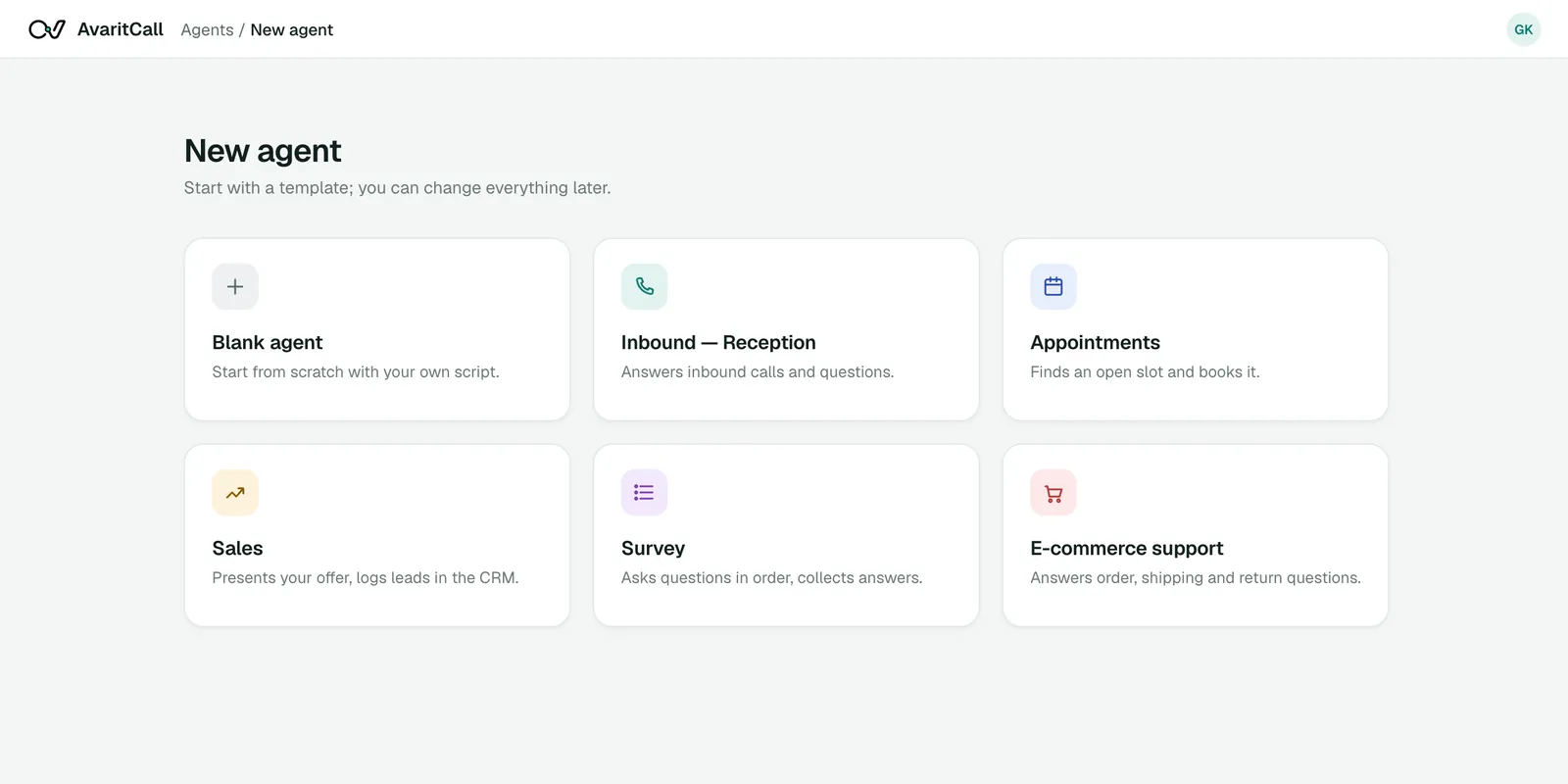
Build an Agent per Client Campaign
Each client campaign gets its own agent. An e-commerce support line and a past-due billing campaign can run side by side with different scripts.
- Brand greeting and approved answers
- Questions the agent asks
- Fields saved on each call
- Transfer rules and target numbers
Deploy
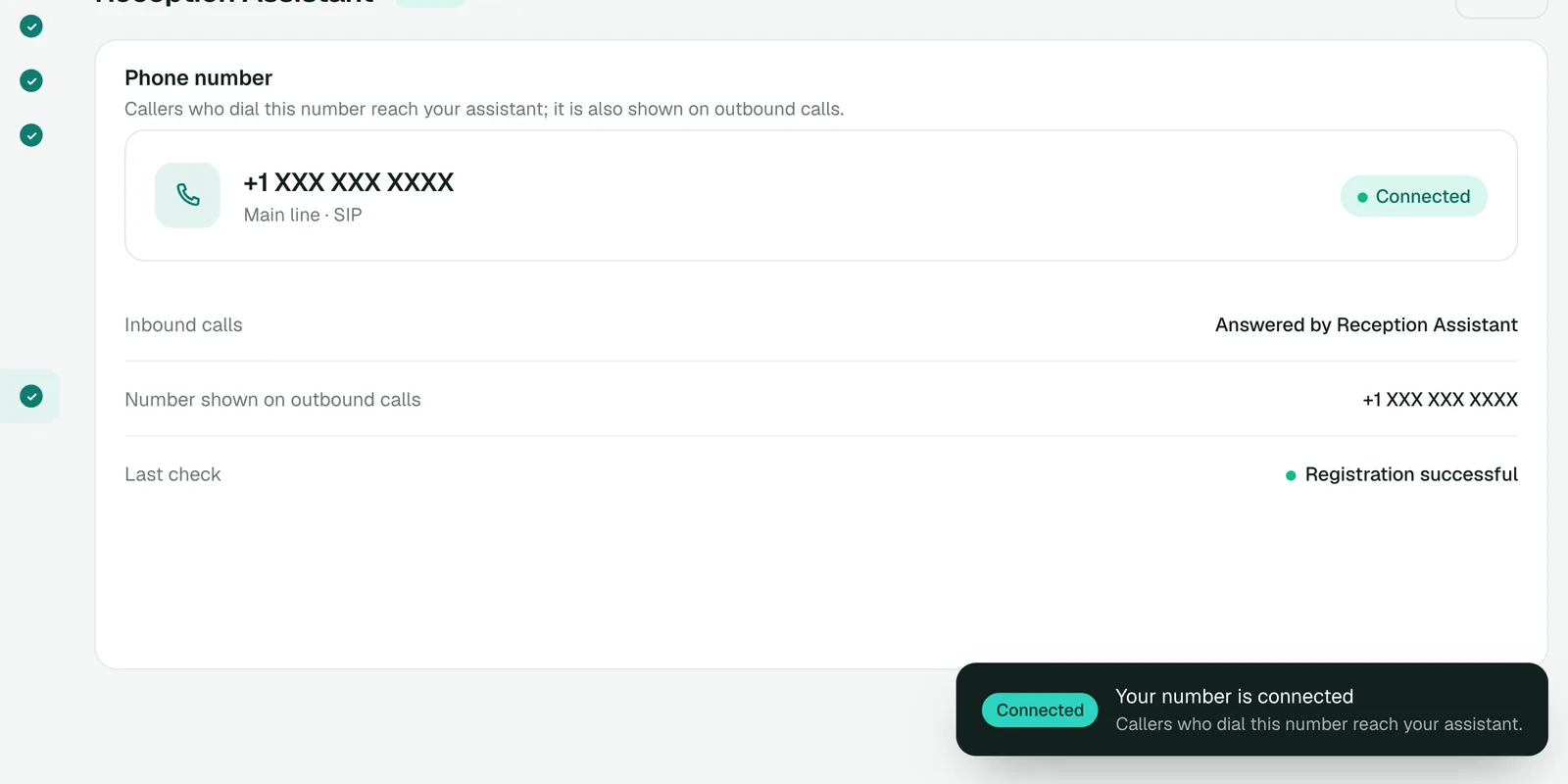
Route Inbound Lines and Launch Outbound Lists
For inbound, your phone system decides which client line reaches the agent and when. For outbound, upload the client's list and set when it calls.
- Connect client lines over SIP
- Send all calls, overflow or after-hours calls
- Calling days, hours and time zone for outbound lists
- A retry count from 0 to 5 and the gap between attempts
Monitor
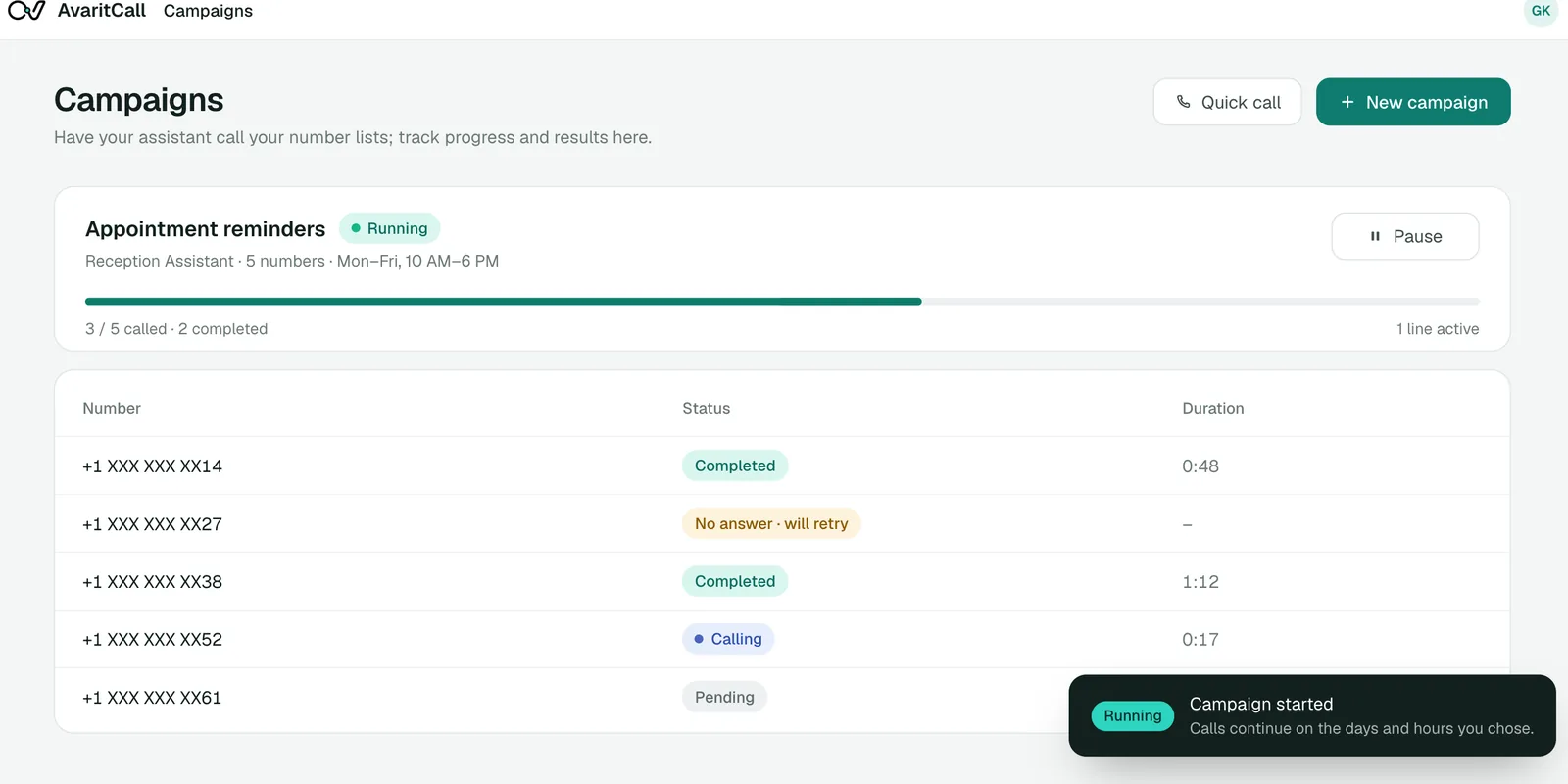
Review Each Campaign's Calls
Your operations lead can open any call to see the outcome, the summary and the full transcript, campaign by campaign.
- Call outcomes per campaign
- Transferred calls
- Pending callbacks
- Summary and transcript for each call
Transfer Calls to the Right Team With Context
Route Escalations to the Right Queue
Transfers follow the campaign and the reason for the call. A refund dispute on a support line goes to the client's support queue, while a balance dispute on a billing campaign goes to their billing team. If the target line doesn't answer, a fallback number can ring or a callback request is saved.
Control What Gets Logged and Where It Goes
You choose the fields saved for each campaign. Team members see only the agents and permissions you give them, so staff on one client's campaign don't see another client's calls. Transcripts are kept for a set retention period and then deleted automatically, and card numbers and other supported personal data formats are masked before the text reaches the language model. If a client contract asks for specific record handling, go over it with our team before launch.
Talk to sales
Example handoff
Transferred to Billing
- Campaign
- Clearline Internet, past-due billing
- Reason
- Customer questions a late fee
- Customer ref.
- CL-20417
- Next step
- Billing team reviews the fee
Connect Your Contact Center, CRM, and Client Systems
Each group shows what works today and what our team builds for a client's setup.
Ready
Telephony & Contact Center Routing
- Twilio
- Telnyx
- Plivo
- Any SIP trunk or PBX
Connect existing numbers over SIP. Your contact center's routing decides which calls reach the agent, such as overflow at peak times, and the agent can transfer calls back to your live agents.
Set up by our team
CRM & Customer Support Tools
- AvaritCall CRM
- Custom HTTP tools
Call outcomes and follow-up tasks are kept in the AvaritCall CRM. Looking up a customer, writing an outcome or opening a ticket in a client's own CRM or help desk goes through that system's API with a custom tool, and what each one can do depends on that API.
Ready
APIs, Webhooks & Client Reporting
- REST API
- Webhooks
Start calls through the REST API and get a signed webhook when each one ends, with the outcome, the campaign and the follow-up fields. Send that data to the client's system or to your own reporting.
Choose a Client Campaign
Start with one client and one type of call, such as overflow support or a past-due list.
Set Call & Handoff Rules
Write the greeting, approved answers, saved fields and the transfer number for each situation.
Connect Your Phone and CRM
Connect the client line over SIP and choose where outcomes go, in the AvaritCall CRM or through webhooks.
Test Calls & Launch
Play the customer in a few test calls from your browser, then route live calls to the agent.
| Connection | Connection type | Look Up a Customer | Transfer a Call | Sync Call Outcomes |
|---|---|---|---|---|
| Uploaded call list | Ready | Yes, from the list fields | No | Yes, in the AvaritCall CRM |
| SIP trunk or PBX | Ready | No | Yes | No |
| Client CRM or help desk | Custom, through its API | Depends on the API | No | Depends on the API |
| REST API & webhooks | Ready | No | No | Yes, after each call |
AI Voice Agent Pricing for BPOs
You pay for talk minutes, so you can work out what each client campaign costs from its expected call time.
$0.08
per talk minute, billed per second
Example calculation
- 45-second call
- $0.06
- 2 min 30 s call
- $0.20
- 5-minute call
- $0.40
- Pay as you go, billed per second of talk time
- Ringing and unanswered calls are free, and billing stops when a call is transferred
- Inbound capacity follows your line's channel count. Outbound campaigns run 5 concurrent calls per agent by default, and more are available on request
- Emails and WhatsApp messages you choose to send are billed per message
- Custom integrations with a client's systems are scoped per campaign
Frequently Asked Questions
What can AI voice agents do for a BPO contact center?
They answer inbound calls and run outbound campaigns for your client brands. Each agent follows its own client's script, saves the outcome fields you choose and transfers calls to live agents when your rules say so.
Can we configure different scripts and rules for each client campaign?
Yes. Each client campaign runs on its own agent with its own greeting, approved answers, questions, saved fields and transfer numbers. Changing one campaign doesn't touch the others.
Can AvaritCall handle inbound support and outbound calls?
Yes, both. Inbound lines connect over SIP, and outbound campaigns call from an uploaded list on the days and hours you set.
Can we use AI agents for overflow and after-hours calls only?
Yes. Your contact center's routing decides which calls reach the agent, so you can send only overflow or only after-hours calls. Your live agents keep the rest of the queue.
How are calls transferred to the right live agent or client queue?
By campaign and by the reason for the call. You set a target number for each situation, such as a refund dispute or a billing question. If nobody answers, a fallback number can ring or the agent saves a callback request with the details.
Can we connect our existing contact center software and CRM?
Phone routing, yes, over SIP. A client's CRM or help desk connects through its API with a custom tool, and what it can read or write depends on that API. Call outcomes can go to any system through webhooks.
How are call records and outcomes handled across client campaigns?
Each call is saved with its campaign, outcome, summary and transcript. Team members see only the agents you give them access to, and transcripts are deleted automatically after a set retention period. Outcomes can also go to the client's own system through webhooks.
How much does it cost to run AI voice agents for a BPO?
It's $0.08 per talk minute, billed per second, so 1,000 talk minutes on one client campaign cost $80. Higher concurrency and custom integrations are scoped with our team for each campaign. New accounts start with $5 in credit and no card required.
Launch an AI Agent for Your Next Client Campaign
Start with one client and the support calls that spill over at peak hours. In a demo, you'll see the calls the agent answered, the tickets it opened and the calls it passed to your live team on that campaign's screen.