
AI Appointment Scheduling That Turns Calls Into Bookings

AI appointment scheduling with AvaritCall answers your business line, asks what the caller needs and checks open times in your connected calendar. When the caller picks a slot, the agent confirms the details and books the appointment. Each booking is saved with a call summary, so your team spends less time on scheduling calls.

Front desk staff member at a clinic reception

Sample call

Caller
Hi, I'd like to book a consultation for Friday afternoon.
Caller
In person, please.
AI agent
There's an opening at 2:30 PM on Friday. Would that work for you?

Appointment Booked

Service
In-person consultation
Time
Friday, 2:30 PM
Calendar
AvaritCall calendar

Next step: Summary saved with the booking

Experience AI Appointment Booking in Action

Listen to how the agent finds a time, confirms it and saves the booking. Each sample shows the details the call produces. You can test your own booking flow in your browser after you sign up.

Inbound call

Play sample call

0:35

AI agentThanks for calling Willow Hair Studio. I'm the studio's virtual assistant. How can I help you today?
CallerHi, I'd like to book a haircut and color for next week.
AI agentSure. A cut and color takes about two hours. Do you have a day in mind?
CallerWednesday or Thursday, ideally in the morning.
AI agentI have Wednesday at 9:30 AM or Thursday at 10 AM. Which one works better?
CallerThursday at ten is perfect.
AI agentGreat. Can I have your name and the best number to reach you?
CallerIt's Emma Collins, and you can use this number.

Result

Appointment Booked

Service
Haircut and color
Time
Thursday, 10:00 AM
Customer
Emma Collins
Phone
+1 XXX XXX XXXX

Next step: Booking and call summary visible in the dashboard

These are fictional sample calls. Names, businesses and times are examples, and no real calendar entries are created.

Everything You Need to Manage Appointment Calls

  • Real-Time Calendar Availability

    During the call, the agent checks open slots in your connected calendar and offers the caller real options. Your staff no longer has to look up availability for every request.

  • Automated Appointment Booking

    The agent collects the details you require, such as name, phone number and service, and books the confirmed time in the AvaritCall calendar or Cal.com.

  • 24/7 Appointment Assistance

    Calls that come in after hours or on weekends are still answered. Callers can book an open slot or leave a request for your team instead of hanging up.

  • Natural Booking Conversations

    Callers describe the service and time they want in their own words. They can interrupt or change their mind, and the agent adjusts the options it offers.

  • Human Support When Needed

    When a request needs a staff member, the agent transfers the call to the number you choose, based on rules you set. If no one answers, it takes a message instead.

  • Appointment Records & Call Summaries

    Every call produces a transcript, a summary and the fields you defined. Your team can see why a customer booked before the appointment starts.

From Incoming Call to Confirmed Appointment

This is how a booking call moves from the first question to a confirmed time.

  1. Tell the Assistant What You Need

    The customer calls your business and says which service they want, in their own words.

  2. Find an Available Time

    The agent checks open slots in your connected calendar, following the booking rules in its instructions, and offers the closest options.

  3. Confirm the Appointment Details

    The customer picks a time. The agent repeats the service, date and time and collects the contact details you require.

  4. Save the Booking to Your Calendar

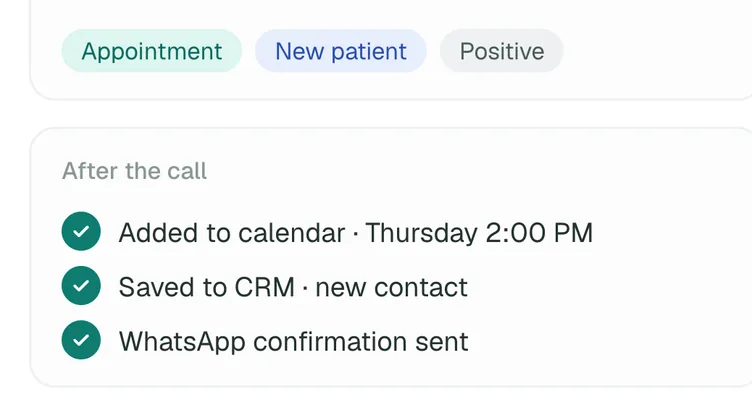
    The appointment is added to the calendar and linked to the call record with its transcript and summary.

Call record in the AvaritCall CRM after a booking call

See How an AI Booking Conversation Flows

A short request becomes a calendar entry your team can see at a glance.

Example conversation

Caller
I'd like to book a consultation for Friday afternoon.
AI agent
I can check that for you. Would you prefer an online or in-person appointment?
Caller
In person.
AI agent
There's an opening at 2:30 PM. Would that work for you?
Caller
Yes, that works.
AI agent
May I have your name to complete the booking?

Appointment record

Booked

Service
In-person consultation
Confirmed time
Friday, 2:30 PM
Customer
Name and phone number from the call
Summary
First consultation, prefers in-person

Example data. The appointment is booked only when a calendar is connected.

Appointment Booking for Everyday Business Needs

  • Healthcare & Dental Clinics

    The agent asks whether the caller needs a checkup, a cleaning or a follow-up visit and offers matching times. Medical questions go to your staff.

  • Beauty & Wellness Businesses

    Salons, spas and studios can book services by type and length, for example a 60-minute massage or a cut and color, while staff stay with clients.

  • Automotive Services

    The agent takes the customer's name, vehicle and the service needed, such as an oil change or brake check, and books a time in the service calendar.

  • Professional Services & Property Viewings

    Consultancies, law offices and real estate teams can schedule first meetings and showings at times that suit both sides.

Connect Booking Calls to Your Calendar and Business Tools

Choose where bookings are saved and where call results go. Each card shows whether the connection is ready in the dashboard, in beta or set up with our team.

  • Ready

    AvaritCall Native Calendar

    • AvaritCall calendar

    Manage appointments in the calendar built into AvaritCall. The agent checks availability and books into it during the call, and your team sees each booking in the dashboard.

  • Beta

    Cal.com Integration

    • Cal.com

    Connect a Cal.com event type with your API key and time zone. The agent reads open slots and creates bookings for that event type.

  • Ready

    CRM & Customer Records

    • AvaritCall CRM

    Every call is logged to the built-in AvaritCall CRM with the caller's details, summary and tags. Beta connectors for HubSpot, Pipedrive, Salesforce, Zoho CRM, Bitrix24 and HighLevel can also create a contact or lead from call data.

  • Ready

    REST API & Webhooks

    • REST API
    • Webhooks
    • Custom HTTP tools

    Receive a signed webhook when a call ends and read transcripts and summaries through the REST API. For a scheduling system you already use, the agent can call your own API during the call.

How Businesses Use AvaritCall to Manage Appointment Requests

An Example Day of AI Appointment Booking

  1. 7:40 AM, before opening

    A caller asks for the first available cleaning. The agent offers two morning slots and books the one the caller picks.

  2. 12:15 PM, during a busy lunch hour

    Three callers ring at once while the front desk is with patients. The agent answers each call, books two appointments and transfers a billing question to staff.

  3. 8:05 PM, after closing

    A new customer asks about a first consultation. The agent explains what the visit covers and books a time for next week.

  4. What the team reviews the next morning

    Staff open the dashboard and see each booking with its call summary, plus the one message that needs a callback.

Frequently Asked Questions

What is AI appointment scheduling?

AI appointment scheduling is a voice agent that answers booking calls, checks your calendar and books appointments without a staff member on the line. AvaritCall handles the conversation, confirms the time with the caller and saves the booking with a call summary.

How does AI appointment booking work over the phone?

The caller says what they need, the agent offers open times, and the caller picks one. The agent then repeats the details, collects the information you require and books the appointment in your connected calendar.

How does an AI assistant check available appointment times?

It queries your connected calendar during the call. With the AvaritCall calendar or a Cal.com event type, the agent sees open slots in real time and only offers times that are free.

Can customers book appointments outside business hours?

Yes. The agent answers 24/7, so callers can book an open slot at night or on weekends. Your team sees those bookings and their summaries in the dashboard the next time they log in.

Which calendars does AvaritCall support?

AvaritCall supports its built-in calendar, which is ready to use, and Cal.com, which is in beta. A HighLevel calendar can be connected with our team. Other scheduling systems can be reached through the REST API or a custom HTTP tool.

Can I define appointment types and durations in AvaritCall?

Partly. Each agent has one appointment duration in the built-in calendar. For several appointment types or lengths, connect a Cal.com event type for each type or set up a separate agent, and describe the types in the agent's instructions.

Can AvaritCall transfer booking calls to a human agent?

Yes. The agent transfers the call to the number you choose when the caller asks for a person or when your rules say so. If the first destination does not answer, a fallback number can be dialed; otherwise the agent takes a message and the summary goes to your dashboard and notifications.

How do I set up AI appointment scheduling with AvaritCall?

Create an agent from a template, add your services and booking rules, connect your calendar and test it in your browser. Then connect your phone number over SIP. No code is required, and you can start with $5 in free credit.

Make Your Next Appointment Easier to Book

Let callers hear open times and book them by phone, at any hour. Your team gets organized bookings with a summary for each call.

Get Started