



AI Receptionist for Small Businesses That Answers Calls and Books Appointments

The AvaritCall AI receptionist answers your business line while you and your staff are with customers. It answers questions about hours, location and services, books appointments in your calendar and transfers callers to the right person when needed. Every call the agent handles is saved with a summary, so your team can follow up on each request.

Small business owner at her desk taking a call passed on by the AI receptionist

Sample call

Transferred to Staff

Caller
Michael Grant
Asked for
Jessica

Next step: Call summary available in the dashboard

Hear Your AI Receptionist in Action

Pick a call type to hear how the receptionist handles it and what it records. After you sign up, you can test your own receptionist in your browser.

Inbound call

Play sample call

0:41

AI agentThanks for calling Oakwood Pet Grooming. I'm the virtual receptionist. How can I help?
CallerHi, are you open on Sundays?
AI agentYes. We're open Sunday from 10 AM to 4 PM, and Monday through Saturday from 8 AM to 6 PM.
CallerGood. Do you groom cats too, or just dogs?
AI agentWe groom both. A cat groom includes a bath, brushing and a nail trim, and takes about an hour.
CallerAnd where are you located?
AI agentWe're at 412 Oak Avenue, next to the post office, with free parking out front. Would you like to book a visit?
CallerNot today, thanks. That's all I needed.

Result

Question Answered

Topics
Sunday hours, cat grooming, location
Booking
Not requested

These are fictional sample calls. Names, businesses and addresses are examples.

Handle Everyday Calls Without Interrupting Your Team

  • 24/7 Call Answering

    Calls are answered after hours and when everyone is busy. Customer requests are captured instead of lost in missed calls.

  • Appointment Booking & Scheduling

    The receptionist checks open times in your connected calendar and books the slot the caller picks, so staff spend less time on routine booking calls.

Front desk staff member helping a walk-in customer while the AI receptionist answers the phone
  • Business Information & FAQs

    Hours, location, services and policies come from the knowledge you add, such as documents, web pages or plain text, so answers match your business.

  • Call Routing & Human Transfers

    Callers are transferred to the right person or team based on what they need. You decide when to transfer and to which number.

Small business team checking orders and requests together at a computer
  • Messages & Callback Requests

    When no one can take the call, the receptionist records the caller's name, number, request and a good time to call back.

  • Call Summaries & Request Tracking

    Review transcripts, summaries and outcomes in the dashboard, and see every request that came in during the day.

Small business team reviewing call summaries and callback requests on a computer

Get Your AI Receptionist Ready for Your Business

You set up and test the receptionist in your browser. How long it takes to connect your number depends on your phone provider.

  1. Add Your Business Information

    Add your services, hours, address and common questions as text, documents or web pages.

  2. Define How Calls Should Be Handled

    Write the rules for booking, taking messages and transferring callers to staff, including the numbers to transfer to.

  3. Connect Your Phone and Business Tools

    Connect your existing number over SIP and link your calendar and other tools.

  4. Test Calls and Go Live

    Try sample requests in your browser or with a test call to your number, adjust the instructions and switch the receptionist on.

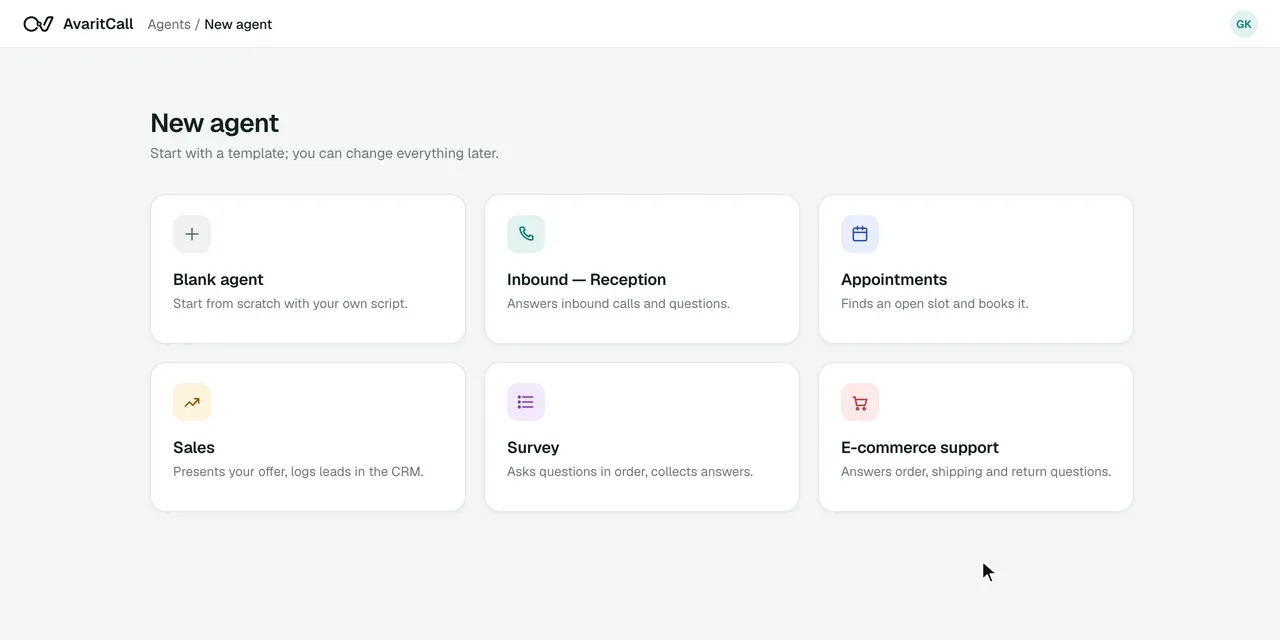
Creating an agent in the AvaritCall dashboard
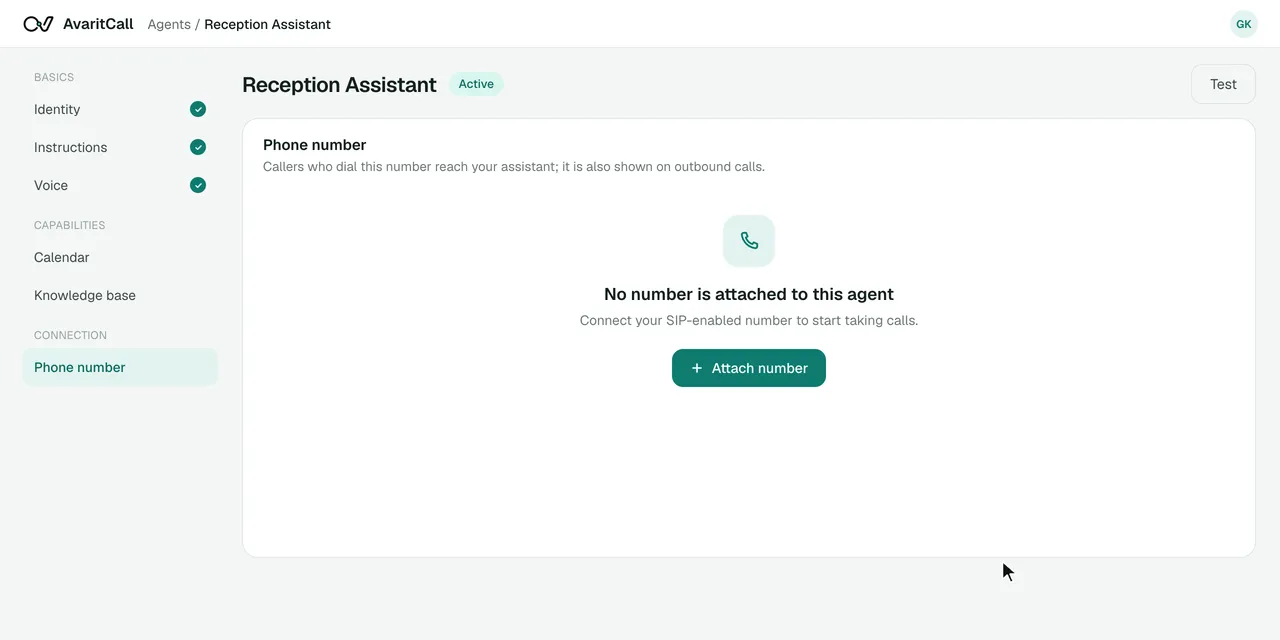
Connecting a phone number over SIP in the AvaritCall dashboard

See How a Customer Request Becomes a Clear Next Step

When the right person is busy, the receptionist turns the call into a request your team can act on.

Example conversation

Caller
Hi, could I speak with someone about getting a quote?
AI agent
Of course. What service are you interested in?
Caller
Weekly cleaning for a small office.
AI agent
The team is currently unavailable. Would you like me to take your details for a callback?
Caller
Yes, please.
AI agent
May I have your name, phone number, and a convenient time to reach you?

Callback request

Callback Requested

Customer
Name from the call
Service
Weekly office cleaning, quote
Phone
+1 XXX XXX XXXX
Preferred callback
Time given by the caller
Summary
New customer asking for a cleaning quote

Example data. The preferred time is recorded for your team; it is not a booked appointment.

A Front Desk for Different Small Business Needs

  • Medical & Dental Clinics

    Answer questions about location and hours, handle appointment requests and take messages for clinic staff. Medical questions are passed to the team.

  • Beauty & Wellness Businesses

    Share service details and prices you provide, offer open appointment times and take calls while staff are with clients.

  • Home & Automotive Services

    Find out what service the caller needs, collect the address or vehicle details and pass the request to the right person.

  • Real Estate & Professional Offices

    Handle first calls for real estate, law and consulting offices, schedule meetings and leave clear messages for the right person.

Connect Your AI Receptionist to Your Business Tools

Each card shows what the connection does and whether it is ready, in beta or set up with our team.

  • Ready

    Phone Systems & SIP

    • Twilio
    • Telnyx
    • Plivo
    • Any SIP trunk or PBX

    Keep your existing number and connect it over SIP. Route all calls, only after-hours calls or only overflow calls to the receptionist using your carrier's or PBX's forwarding rules.

  • Ready

    Calendar & Appointment Scheduling

    • Cal.com (beta)
    • AvaritCall calendar

    The receptionist checks open times and books appointments in the AvaritCall calendar. Cal.com is available in beta.

  • Ready

    CRM & Customer Records

    • AvaritCall CRM

    Each caller is matched to a contact in the built-in AvaritCall CRM, with messages and call results on their timeline. Beta connectors for HubSpot, Pipedrive, Salesforce, Zoho CRM, Bitrix24 and HighLevel can create a contact or lead.

  • Ready

    API & Workflow Automation

    • REST API
    • Webhooks
    • Email reports

    Send callback requests and call results to your own systems with signed webhooks and the REST API, or through n8n, Zapier and Make (beta).

How Small Businesses Manage Calls with AvaritCall

An Example Day with an AI Receptionist

  1. 9:10 AM, an information request

    A caller asks whether the shop is open on Saturday and where to park. The receptionist answers from the business information and the call ends there.

  2. 1:30 PM, a busy hour

    The owner is with a customer when a new client calls about a quote. The receptionist takes the details and a preferred callback time.

  3. 7:45 PM, after closing

    A regular customer calls to book next week's appointment. The receptionist offers open times and books one.

  4. What the owner reviews

    At the end of the day, the dashboard shows one answered question, one message to return and one new booking, each with a summary.

Frequently Asked Questions

What is an AI receptionist for small businesses?

An AI receptionist is a voice agent that answers your business calls, answers common questions, books appointments and transfers callers to staff. AvaritCall saves every call with a transcript and summary, so small teams can stay with their customers.

What types of calls can an AI receptionist handle?

It can handle questions about hours, location, services and prices you provide, appointment requests, messages and callback requests, and calls that need a specific person. Anything outside its instructions is transferred or taken as a message.

Can an AI receptionist answer calls outside business hours?

Yes. The receptionist answers 24/7, including nights and weekends. You can also send only after-hours or overflow calls to it using your carrier's or PBX's forwarding rules.

Can an AI receptionist book appointments and take messages?

Yes. With the AvaritCall calendar or Cal.com (beta) connected, it offers open times and books appointments. When no one is available, it records the caller's message, number and preferred callback time.

Can I keep my existing business phone number with AvaritCall?

Yes. You connect your existing number over SIP, with presets for Twilio, Telnyx and Plivo, or any SIP trunk or PBX. AvaritCall charges no number or line fees; your carrier's charges stay with your carrier.

How does AvaritCall learn about my business?

From the instructions and knowledge you give it. You can add PDFs, documents, web pages or plain text about your services, hours and policies, and update them at any time.

What happens when AvaritCall needs to transfer a call to a person?

The receptionist transfers the call to the number you choose when the caller asks for a person or when your rules say so. If the first destination does not answer, a fallback number can be dialed; if the transfer fails, the caller stays with the receptionist, who can take a message. The call summary is available to your team in the dashboard and notifications.

How much does AvaritCall's AI receptionist cost, and what affects the price?

You pay $0.08 per talk minute, billed per second, so the price depends on how many minutes your calls last. Ringing, unanswered calls and the transferred part of a call are not charged, and there is no setup fee or commitment. New accounts get $5 in credit, no card required.

Give Your Small Business a Smarter Front Desk

Answer calls around the clock, handle everyday questions, book appointments and leave your team clear requests to follow up on.

Try AI Receptionist