
AI Agents for Accounting
AvaritCall gives accounting firms AI agents that call clients about missing documents and answer incoming questions about document delivery. Before month-end, your team sees which client owes which document, the date they gave on the call and who picks up the follow-up.

Sample call
- AI agent
- We're still waiting on your October receipts and the card statement before month-end.
- Caller
- I'll upload everything by Thursday. Can you send the portal link again?
- AI agent
- Sent by email. I've noted Thursday for the upload.
Upload Date Logged
- Expected
- October receipts, card statement
- Client's date
- Thursday
- Portal link
- Resent by email
Next step: Assigned accountant checks the portal on Friday
Hear How AI Handles Document and Client Follow-Ups
Pick a scenario to read the call. Each one shows the outcome and the next step for your accounting team.
Outbound call
Missing Bank Statement
Result
Upload Date Logged
- Client
- Chen Floral Studio
- Expected document
- October bank statement
- Client's date
- Wednesday
- Verification
- Completed
Next step: Bookkeeper checks the portal after Wednesday
The calls, clients and documents are made up. Each firm sets its own verification steps, the details the agent may share and when a call goes to an accountant.
Inbound call
Document Receipt Check
Result
Documents Received
- Client
- Ortiz Plumbing
- Documents
- 14 expense receipts, November
- Source
- Connected client portal
- Verification
- Completed
Next step: No follow-up needed for November receipts
The calls, clients and documents are made up. Each firm sets its own verification steps, the details the agent may share and when a call goes to an accountant.
Inbound call
New Bookkeeping Client Setup
Result
Onboarding Call Booked
- Client
- New bookkeeping client
- Starter list
- Sent by email
- Onboarding call
- Monday, 11 am
Next step: Accountant sees the booking in the calendar
The calls, clients and documents are made up. Each firm sets its own verification steps, the details the agent may share and when a call goes to an accountant.
Keep Accounting Client Work Moving From Onboarding to Month-End
New Bookkeeping Client Onboarding
Before the first meeting, new clients hear which documents to prepare and how to use your client portal. If they need more help with the scope of service or the first reporting period, the agent books a call with their accountant.
Missing Document Follow-Ups
Clients who still owe a bank statement, purchase invoice or receipt get a call from the list your firm prepares. The follow-up record shows the document, the period it belongs to and the date the client gave.
Document Receipt and Portal Questions
The agent answers questions about uploading, portal access and delivery status. If your portal is connected, it can confirm a document has arrived. Requests that need someone to review a document go to your team.
Month-End and Filing Preparation Reminders
Before a month-end close or a filing, clients are reminded of the document deadline your firm gave them. If a client asks for more time, the call goes to the accountant who handles that client.
Payroll Input Follow-Ups
Before payroll runs, clients with missing timesheets or staff changes get a call. The agent explains which information is expected and how to send it. Questions about payroll calculations go to your team.
Accountant Appointments and Client Callbacks
For monthly reviews, document checks or a service start, the agent offers open times in a connected calendar. When the accountant needs to approve the meeting, the client's preferred time is saved as a callback.
Accounting answering service
Set Follow-Up Rules by Client, Document, and Reporting Period
Build
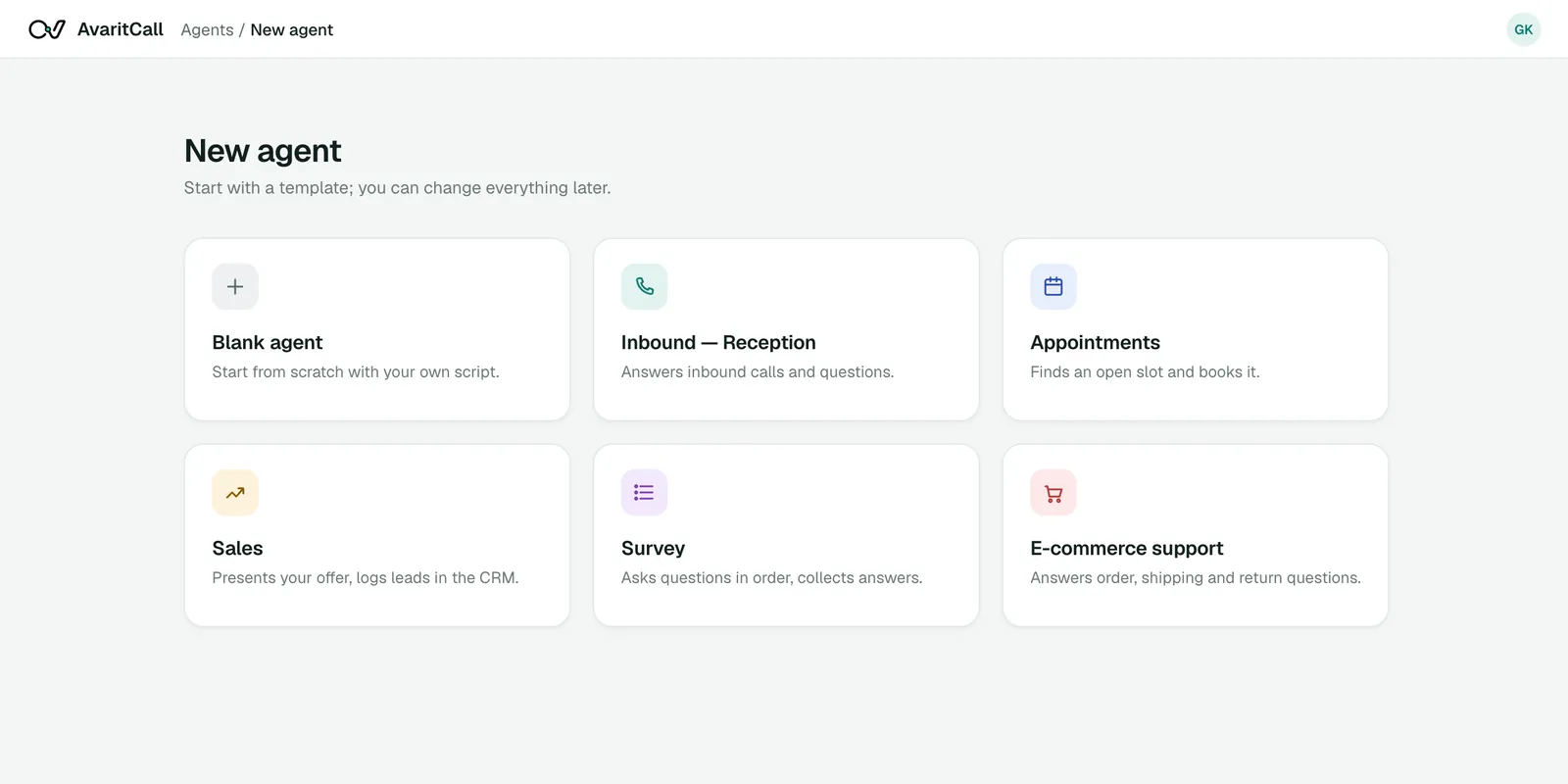
Build a Flow for Each Kind of Follow-Up
Give monthly document chasing, payroll preparation and new client onboarding their own call flows. Each one names the document type, the period, the delivery channel and the team responsible.
- Separate flows for documents, payroll and onboarding
- Document type and reporting period on every call
- The portal or channel clients use to send files
- The accountant or team that takes exceptions
Deploy
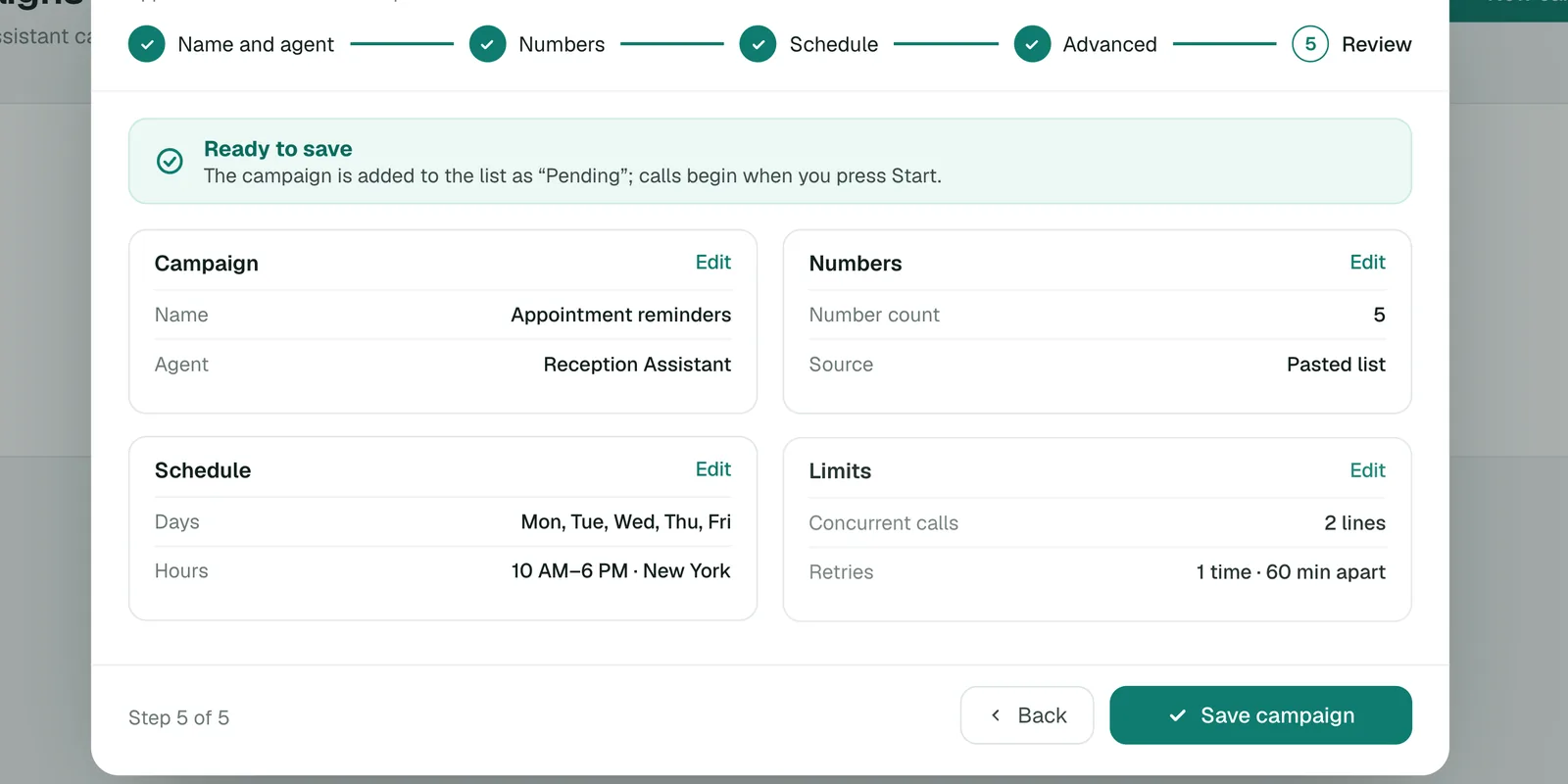
Choose When Calls Go Out and When They Stop
Upload a call list and set the calling window. Follow-up for a client stops once a connected system confirms the document arrived or your team takes it over.
- Calling days, hours and time zone
- A retry count from 0 to 5 and the gap between attempts
- Calls stop when the document is confirmed or staff take over
- Clients who ask not to be called are marked do-not-call automatically
Monitor
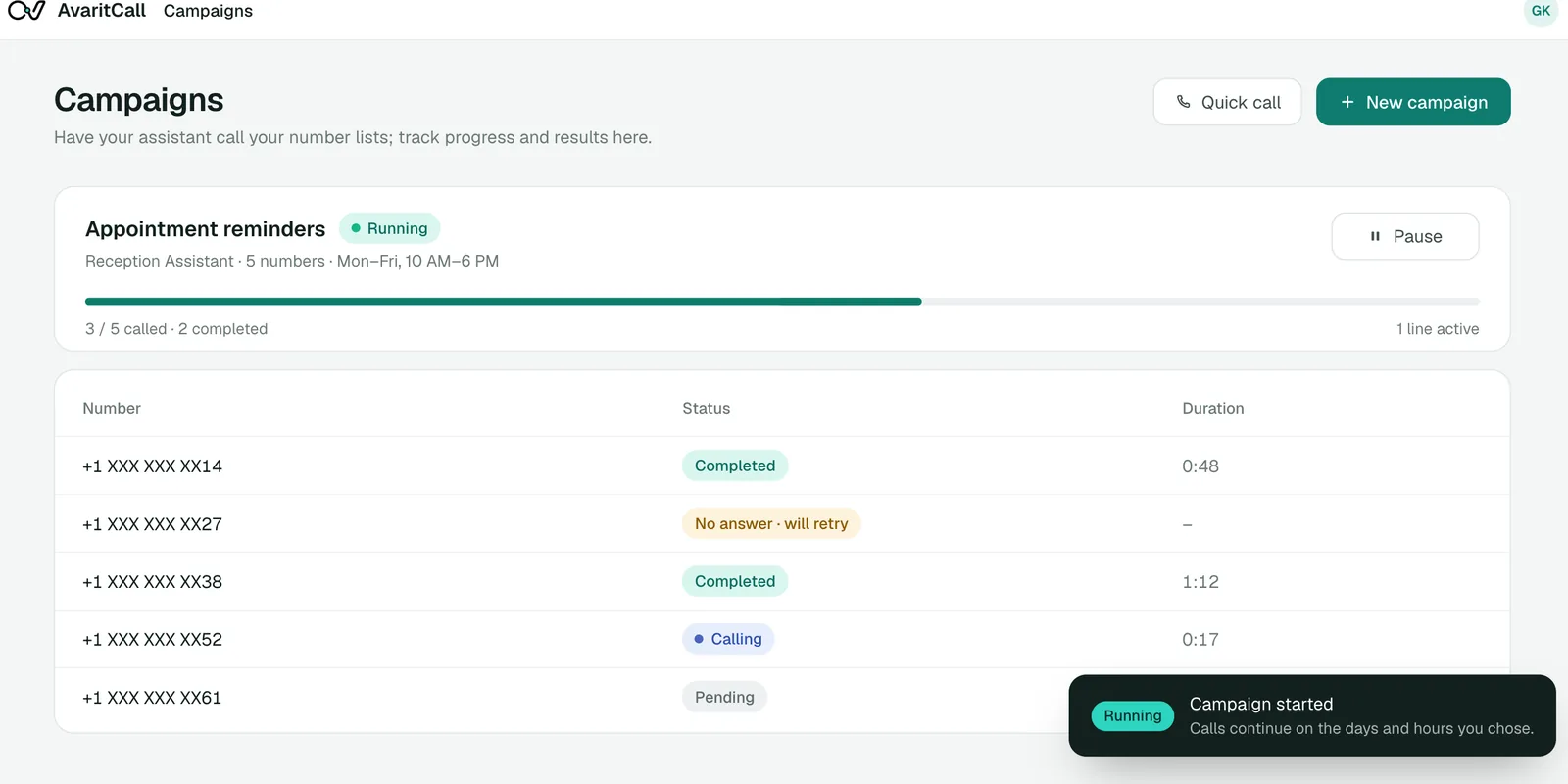
See What Each Client Still Owes
See what happened on each call. A document confirmed in your connected portal shows separately from a date the client promised.
- Clients who gave an upload date
- Clients who asked for portal help
- Requests waiting for an accountant's callback
- Documents confirmed in your portal (when connected)
Protect Client Information and Pass Exceptions to the Right Accountant
These controls back up your firm's own policies. They're product settings, not a compliance certification.
Verify the Caller Before Discussing Client Documents
Your verification steps come before any client-specific detail. If the caller doesn't complete them, the agent shares nothing and offers a callback. Statements, payroll files and tax documents are never taken over the phone, and clients are pointed to the portal your firm approves.
Give Accountants the Details They Need to Follow Up
Questions about what a document says, payroll corrections or filing deadlines go to the accountant you choose. If they're busy, a callback request is saved. The agent doesn't give tax advice or interpret notices.
Example handoff
Callback Requested
- Client ref.
- CL-0482
- Period
- Q3
- Expected document
- Purchase invoices
- Client asks
- Whether the filing deadline can move
- Callback
- Tomorrow morning
Connect Your Phone Line, Client Portal, and Accounting Practice Tools
Connections that work today are listed apart from those that need a custom integration. A document counts as received only after your portal confirms it.
Ready
Phone & Follow-Up Lists
- Follow-up list upload
- Twilio
- Telnyx
- Plivo
- Any SIP trunk or PBX
Connect your office line over SIP and start calls from a list with the client reference, period, expected document and due date.
Ready
CRM & Accountant Calendars
 Cal.com (beta)
- AvaritCall CRM
- AvaritCall Calendar
Save each call summary and callback task to the client record in the AvaritCall CRM, and book accountant calls in a connected calendar.
Set up by our team
Client Portal & Practice Management Software
Reading document status and writing call outcomes back are each looked at separately, through REST API and webhook, depending on what your software's API allows. There's no ready-made connector.
Choose Your First Document Follow-Up Workflow
Start with one flow, such as clients who still owe a bank statement for this month.
Connect Your Phone Line and Client Records
Bring your office line over SIP and upload a client list, or have our team look at your portal's API.
Set Verification, Retry, and Handoff Rules
Choose the questions clients answer first, how often calls retry and which accountant takes exceptions.
Test Sample Calls and Launch
Play the client in a test call from your browser, then start the campaign.
| Connection | Import Document Follow-Up Lists | Check Document Receipt | Book an Accountant Call | Log Call Outcomes |
|---|---|---|---|---|
| Follow-up list upload | Yes | No | No | Yes, in the AvaritCall CRM |
| AvaritCall CRM and calendar | Yes | No | Yes | Yes, with callback tasks |
| Custom API connection to your portal | Depends on the API | Depends on the API | Depends on the API | Depends on the API |
AI Agents for Accounting Pricing
You pay for talk time on your calls. There are no plans with bundled minutes and no overage fees.
$0.08
per talk minute, billed per second
Example calculation
- 45-second call
- $0.06
- 2 min 30 s call
- $0.20
- 5-minute call
- $0.40
- Pay as you go, billed per second of talk time
- Ringing and unanswered calls are free
- Outbound campaigns run 5 concurrent calls per agent by default
- Emails and WhatsApp messages you choose to send are billed per message
- A custom connection to your portal or accounting software is scoped with you
Frequently Asked Questions
What can AI agents do for accounting firms?
They make the routine client calls that slow month-end down. The agent calls clients about missing documents, answers portal and delivery questions, books calls with the assigned accountant and saves every outcome so your team knows what to do next.
Can an AI agent call clients about missing statements, invoices, or receipts?
Yes. Upload a list with the client, the period and the expected document. After verification, the agent tells the client what's missing, explains how to send it and saves the date they give.
Can it check whether a client's documents have been received?
Yes, when your client portal is connected through its API. The agent then shares the delivery status it sees. Without that connection, it records the question for your team to confirm.
Can it follow up on missing payroll information before a cutoff?
Yes. A payroll flow calls clients before your cutoff about missing timesheets or staff changes, explains what's expected and how to send it, and passes questions about calculations to your team.
Can it explain how to upload documents to our client portal?
Yes. The agent walks clients through the upload steps your firm approves and can resend the portal link by email. Login problems that need an account change go to your team.
Can it book a call with the accountant assigned to the client?
Yes. With the AvaritCall calendar or Cal.com (beta) connected, the agent offers the accountant's open times and books the call. If the accountant needs to approve it, the client's preferred time is saved as a callback.
What happens if a client asks about a tax notice or filing extension?
The agent doesn't give tax advice or interpret notices. It records the question with the client reference and period, then transfers the call or saves a callback request for the accountant who handles that client.
Can it connect to our client portal or practice management software?
You can start today with an uploaded follow-up list, the AvaritCall CRM and a connected calendar. A connection to your portal or practice management software goes through REST API and webhook, and our team looks at each action separately.
How much do AI agents for accounting cost?
It's $0.08 per talk minute, billed per second, so a document follow-up call of 2 minutes 30 seconds costs $0.20. Unanswered calls are free, and you start with $5 in credit with no card required. There's no setup fee. A custom connection to your portal or accounting software is scoped separately.
Start With the Documents You're Waiting for This Month
Your firm can start with one list of clients who still owe a bank statement for a single period. After the calls, you'll see who gave an upload date, who asked for portal help and which clients are waiting for their accountant to call back.