
Virtual Receptionist Dental Office That Turns Calls into Appointments
AvaritCall is a virtual receptionist dental office teams use to answer patient calls while the front desk takes care of the patients in the room. It takes requests from new and existing patients, books visits in a connected calendar and passes clinical questions to your dental team. It can also cover after-hours calls and busy periods through your forwarding rules, so patients who reach it get a clear next step.

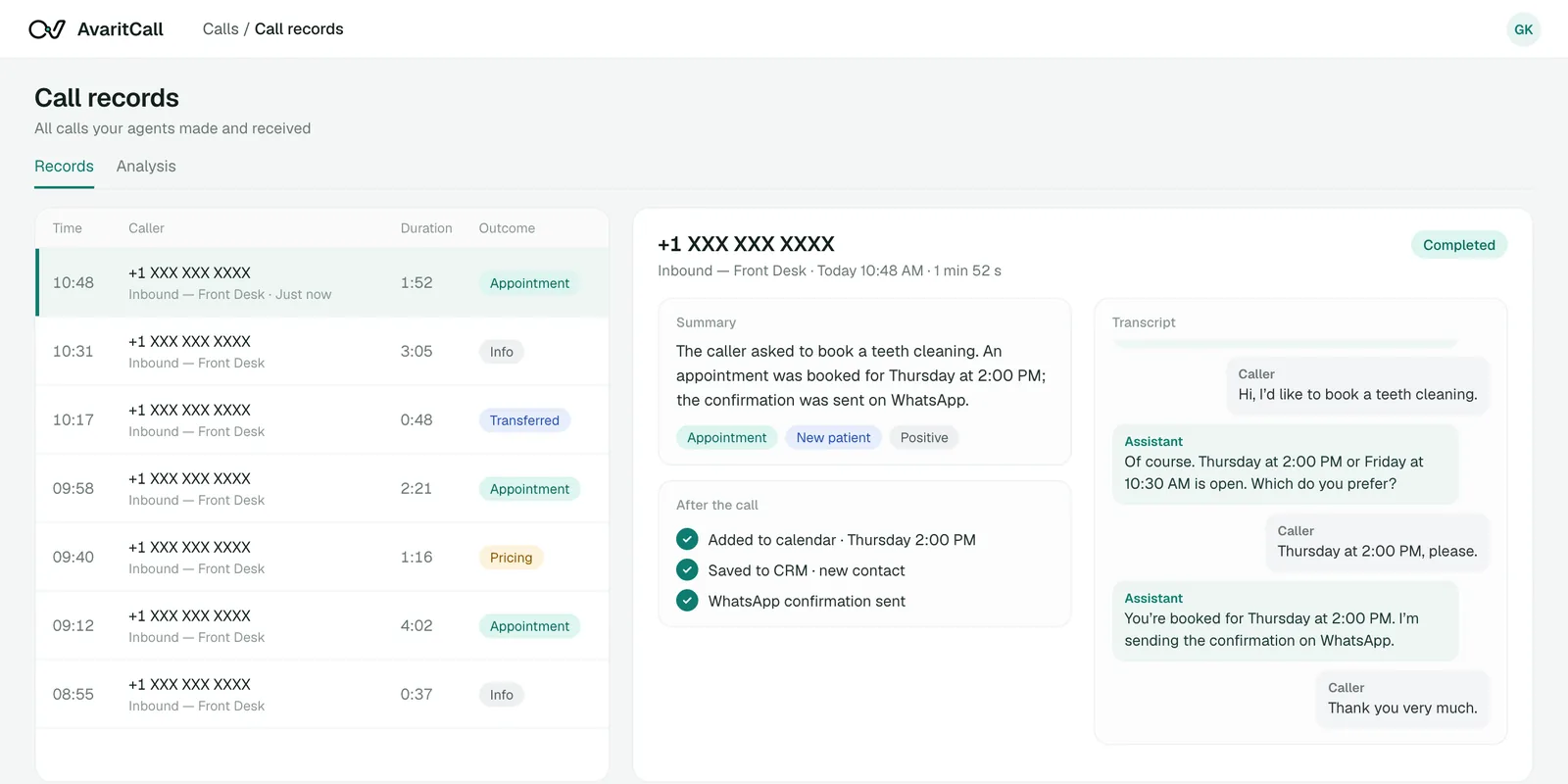
Sample call
- Caller
- Hi, I'm a new patient and I'd like to book a first visit.
- AI agent
- Happy to help. Do you prefer mornings or afternoons?
- Caller
- Mornings, ideally early next week.
- AI agent
- I have Tuesday at 8:30 AM for a new patient exam. Shall I book it?
Appointment Confirmed
- Visit type
- New patient exam
- Time
- Tuesday, 8:30 AM
- Calendar
- AvaritCall calendar
Next step: Front desk sees it in the daily list
Hear How Your AI Dental Receptionist Handles Patient Calls
Choose a scenario. Each sample shows the request, the details collected, the action taken and the result.
Inbound call
Play sample call
0:47
Result
Appointment Confirmed
- Patient
- Sarah Collins (new)
- Visit
- New patient exam and cleaning
- Time
- Tuesday, 8:30 AM
- Phone
- +1 XXX XXX XXXX
Next step: Added to the AvaritCall calendar
These are fictional sample calls with fictional patient details. Booking rules, transfer conditions and the receptionist's limits are set by each practice.
Inbound call
Play sample call
0:34
Result
Awaiting Staff Review
- Patient
- David Park
- Current visit
- Thursday, 3:00 PM cleaning
- Requested
- Monday, 9:00 AM
- Practice rule
- Changes confirmed by the front desk
Next step: Front desk confirms and updates the schedule
These are fictional sample calls with fictional patient details. Booking rules, transfer conditions and the receptionist's limits are set by each practice.
Inbound call
Play sample call
0:25
Result
Transferred to Dental Team
- Patient
- Jordan Lee
- Topic
- Questions about a recommended crown
- Handling
- Transfer under clinic rules
Next step: If unanswered: callback request for the team
These are fictional sample calls with fictional patient details. Booking rules, transfer conditions and the receptionist's limits are set by each practice.
Manage the Calls Your Dental Front Desk Handles Every Day
New Patient Inquiries & First Visits
Share the services, locations and new patient information your practice approves, and take first visit requests. Your front desk starts with the patient's details already recorded.
Appointment Booking & Rescheduling
Check open times and book into the AvaritCall calendar or Cal.com (beta). In the AvaritCall calendar, the receptionist can also change or cancel a visit; with Cal.com, change and cancellation requests are recorded for staff to confirm unless your connected system handles them.
AI appointment schedulingAppointment Confirmations & Reminders
Call patients before upcoming visits, record who will attend and take a request from those who cannot come.
Batch callingRoutine Check-Up & Hygiene Recalls
Run recall campaigns for patients due for a check-up or cleaning, on the schedule your practice sets, and book or record the visit.
Practice Information & Payment Questions
Answer questions about hours, directions, parking and the payment information you approve. Questions about a patient's own costs or coverage go to your staff.
After-Hours Messages & Callbacks
When the practice is closed, the receptionist records the request and contact details so your team can follow up in the morning.
AI answering service
Book Around Your Dentists, Services, and Clinic Rules
New Patient Booking
First visits follow the hours and visit length your practice sets.
First Visit Hours and Length
New patient exams can be limited to specific days and times, and the receptionist collects the contact details you require before booking.
Booked When the Rules Match
When an open slot fits the rules, the visit is booked in the AvaritCall calendar or Cal.com (beta) and the result is Appointment Confirmed.
Existing Patient Request
Check-ups and treatment visits are handled differently.
Check-Ups and Treatment Visits
Routine check-ups can be booked directly. Visits that depend on a treatment plan are recorded as requests, because the dentist decides their timing.
Held for Staff Approval
Requests that need approval are never presented to the patient as booked. The result is Awaiting Staff Review, and the front desk confirms with the patient.
No Suitable Availability
When the requested time is taken, the patient still leaves with a next step.
Offering Alternatives
The receptionist offers the nearest open slots that fit the visit type.
Callback When Nothing Fits
If none of the options work, it records the patient's preferred times and the result is Callback Requested.
Per-Dentist Rules
Separate rules per dentist, location or visit type depend on how your calendar is set up.
Rules by Dentist and Location
Rules for each dentist, location or visit type are set through the receptionist's instructions, separate Cal.com event types or separate agents.
Connected Practice Software
Availability by dentist inside your practice management software is available only when that software is connected through its API.
Keep Clinical Questions with Your Dental Team
When a patient raises a clinical concern, the receptionist does not assess it. It follows the protocol your practice approves and passes the request on in the patient's own words. After hours, or if a transfer is not answered, a fallback number can be dialed or a callback request is recorded.
Example conversation
- Caller
- I had treatment yesterday, and I'd like to speak with someone about a concern.
- AI agent
- I can help pass your request to the dental team. May I have your name and a callback number?
- Caller
- Alex Morgan. You can reach me at this number.
- AI agent
- Thank you. What would you like me to include in your message for the team?
- Caller
- The area is still swollen, and I'd like to know if that's expected.
- AI agent
- I've noted that. I'm transferring you to the team now, and if no one is available, they'll call you back.
Handoff record
Transferred to Dental Team
- Patient
- Alex Morgan
- Callback number
- +1 XXX XXX XXXX
- Request in the patient's words
- The area is still swollen; is that expected?
- Related visit
- Treatment yesterday
- Status
- Transfer attempted; callback if unanswered
Example only. The receptionist does not diagnose or recommend treatment, and it does not replace emergency services; your protocol can tell callers to hang up and dial 911. Pain, swelling, trauma and post-treatment concerns follow the protocol your practice defines and tests.
Connect Your Phone Line and Dental Practice Software
Each connection below lists what it can do today. Dental practice management software connects through its API, not through a ready-made connector.
Ready
Existing Numbers & Call Forwarding
- Twilio
- Telnyx
- Plivo
- Any SIP trunk or PBX
Keep your practice number and connect it via SIP. Send all calls, only unanswered calls or only after-hours calls to the receptionist using your carrier's or phone system's forwarding rules.
Ready
Calendars
 Cal.com (beta)
- AvaritCall calendar
Check availability and book visits in the built-in AvaritCall calendar. Cal.com is available in beta.
Set up by our team
Practice Management Software
Your practice management software can be connected through its API, using AvaritCall's REST API, webhooks and custom tools, with help from our team.
Ready
Patient Records & Notifications
- AvaritCall CRM
- Dashboard notifications
- Webhooks
Each call is logged to the AvaritCall CRM by phone number. Your team is notified in the dashboard or by email, and webhooks send call results to your own systems.
| System | Connection type | Check availability | Create appointment | Change or cancel |
|---|---|---|---|---|
| AvaritCall calendar | Ready | Yes | Yes | Yes |
| Cal.com | Beta | Yes | Yes | Request recorded for staff |
| Your practice management software | Through its API, with our team | Depends on the API | Depends on the API | Depends on the API |
Set Up Your Receptionist and Review Daily Patient Requests
Patient information is visible only to team members you give access to. Transcripts are kept for a defined retention period and then deleted automatically.
Add Your Practice Information
Add services, dentists, hours and approved patient information as instructions and knowledge base documents.
Define Booking and Handoff Rules
Set visit types, the requests that need staff approval and the conditions for transferring a call.
Connect and Test
Connect your number and calendar, then test new patient, change and clinical requests in your browser.
Launch and Review
Go live on the calls you choose. Each day, review new patient requests, bookings, confirmation answers, pending callbacks and transferred calls in the dashboard.
AI Dental Receptionist Pricing
You pay for the time your receptionist spends on calls. There are no plans with included minutes and no overage fees.
$0.08
per talk minute, billed per second
Example calculation
- 45-second call
- $0.06
- 2 min 30 s call
- $0.20
- 5-minute call
- $0.40
- Pay as you go, billed per second of talk time
- Ringing and unanswered calls are free
- Reminder and recall calls are billed the same way as inbound calls
- Emails and WhatsApp messages you choose to send are billed per message
- Inbound capacity follows your line's channel count; outbound campaigns run 5 concurrent calls per agent by default
- No setup fee for self-serve; a connection to your practice software built by our team is scoped with you
Frequently Asked Questions
What is a virtual receptionist for a dental office?
It is an AI voice agent that answers your practice's phone calls, books visits and takes patient requests when your front desk cannot. AvaritCall answers from the information your practice approves, logs every call and passes clinical questions to your team.
How is a virtual dental receptionist different from a dental answering service?
A virtual receptionist does more than take messages. A traditional answering service usually records a message for the morning; AvaritCall can also answer practice questions, book visits in a connected calendar and transfer calls during office hours.
Can AvaritCall book, change, or cancel dental appointments?
It can book new appointments in the AvaritCall calendar or Cal.com (beta), and change or cancel appointments in the AvaritCall calendar. With Cal.com, change and cancellation requests are recorded for your front desk to confirm, unless your practice software is connected through its API to handle them. The patient is always told whether the visit is booked or only requested.
Can AvaritCall follow different rules for each dentist and appointment type?
Yes, within limits. Rules per dentist, location or visit type are set through the receptionist's instructions, separate Cal.com event types or separate agents, and requests that need staff approval are recorded instead of booked.
Which dental practice management systems can AvaritCall connect to?
None through a ready-made connector today. Practice management software can be connected through its API, using AvaritCall's REST API, webhooks and custom tools, with help from our team. Until then, bookings go into the AvaritCall calendar or Cal.com.
Can we keep our phone number and use AI only after hours or during busy periods?
Yes. You keep your number and connect it via SIP. Your carrier's or phone system's forwarding rules decide whether all calls, only unanswered calls or only after-hours calls go to the receptionist.
What happens when a patient reports pain or asks a clinical question?
The receptionist does not diagnose or give treatment advice. It follows the protocol your practice defines, for example by transferring the call to your team or recording a priority callback request, and it passes on the patient's own words. The receptionist does not replace emergency services; your protocol can tell callers to hang up and dial 911.
How are patient data managed, and what affects setup and pricing?
If your organization needs a Business Associate Agreement (BAA) under HIPAA, contact our sales team before deployment to review your requirements. Transcripts are kept for a defined retention period and team access is set per agent. Calls cost $0.08 per talk minute, billed per second, with no setup fee for self-serve accounts; a custom connection to your practice software is scoped with our team.
Give Your Patients an Easier Way to Reach Your Practice
Answer the patient calls your forwarding rules send to the receptionist, keep appointment requests organized and give your front desk the details it needs to follow up. Start with after-hours calls or one location, and expand from there.