
AI Agents for Education
AvaritCall is an AI voice agent that answers incoming calls and makes follow-up calls for universities, colleges and course providers. It answers applicants' questions from your program information, reminds them about missing application steps and sends students to the right team.

Sample call
- AI agent
- Your application is complete except for your official transcript. Should I send the upload link?
- Caller
- Yes, by email, please.
- AI agent
- Sent. Admissions will see the file once it reaches the application system.
Waiting for Document
- Missing document
- Official transcript
- Upload link
- Sent by email
- Application
- On hold until the file arrives
Next step: Admissions checks the application system for the file
Hear How AI Handles Admissions and Student Calls
Pick a scenario to read the call. Each one shows the request, how the call ends and what your team does next.
Inbound call
After-Hours Program Inquiry
Result
Advisor Call Booked
- Applicant
- Priya Shah
- Program
- Evening accounting certificate
- Advisor call
- Wednesday, 5:30 PM
- Calendar
- AvaritCall calendar
Next step: Advisor sees the call on Wednesday's calendar
The calls, applicants, students and institutions are made up. Each institution sets the information the agent may share, its verification steps and when a call goes to staff.
Outbound call
Missing Application Document
Result
Upload Link Sent
- Applicant
- Jamal Wright
- Missing document
- Immunization record
- Deadline
- March 1
- Link sent by
Next step: Application system confirms when the file arrives
The calls, applicants, students and institutions are made up. Each institution sets the information the agent may share, its verification steps and when a call goes to staff.
Inbound call
Tuition Installment Question
Result
Transferred to Student Accounts
- Student
- Erin Walsh
- Installment
- October tuition
- Student says
- Paid, but the portal shows it open
- Transfer
- Connected to student accounts
Next step: Student accounts checks the payment record
The calls, applicants, students and institutions are made up. Each institution sets the information the agent may share, its verification steps and when a call goes to staff.
Support Students From Their First Inquiry to Their First Class
Program Inquiries and Advisor Booking
Callers ask how a program runs, when classes meet, how long it takes and what the published fees are. Those who want to talk it through can book an admissions advisor in your connected calendar.
AI appointment schedulingIncomplete Application Follow-Ups
Applicants who started but didn't finish get a call about the step that's missing, based on the status your institution provides. Trouble uploading a document or getting into the portal goes to the right team.
Batch callingEnrollment Deadlines and Orientation Reminders
Admitted students hear the deadline to confirm enrollment, the orientation time and when their first class starts. Anyone who needs help with a step gets a callback request for your team.
First-Class Attendance and Student Support
Routine questions about class links, campus locations and support office hours get answered. From a list you provide, students who missed their first class can get a call, and any access problem goes to student support.
Tuition and Installment Reminders
Calls go out for upcoming or late installments, using the balance and due date you share. If a student names a payment date, it's saved to the call. Payment confirmation comes from your billing system, depending on the connection.
Re-Enrollment Outreach for Returning Students
Students who haven't signed up for next term hear the registration dates and next steps. Those who want to change programs or talk about courses are passed to an advisor.
Set Call Rules for Each Stage of Enrollment
Build
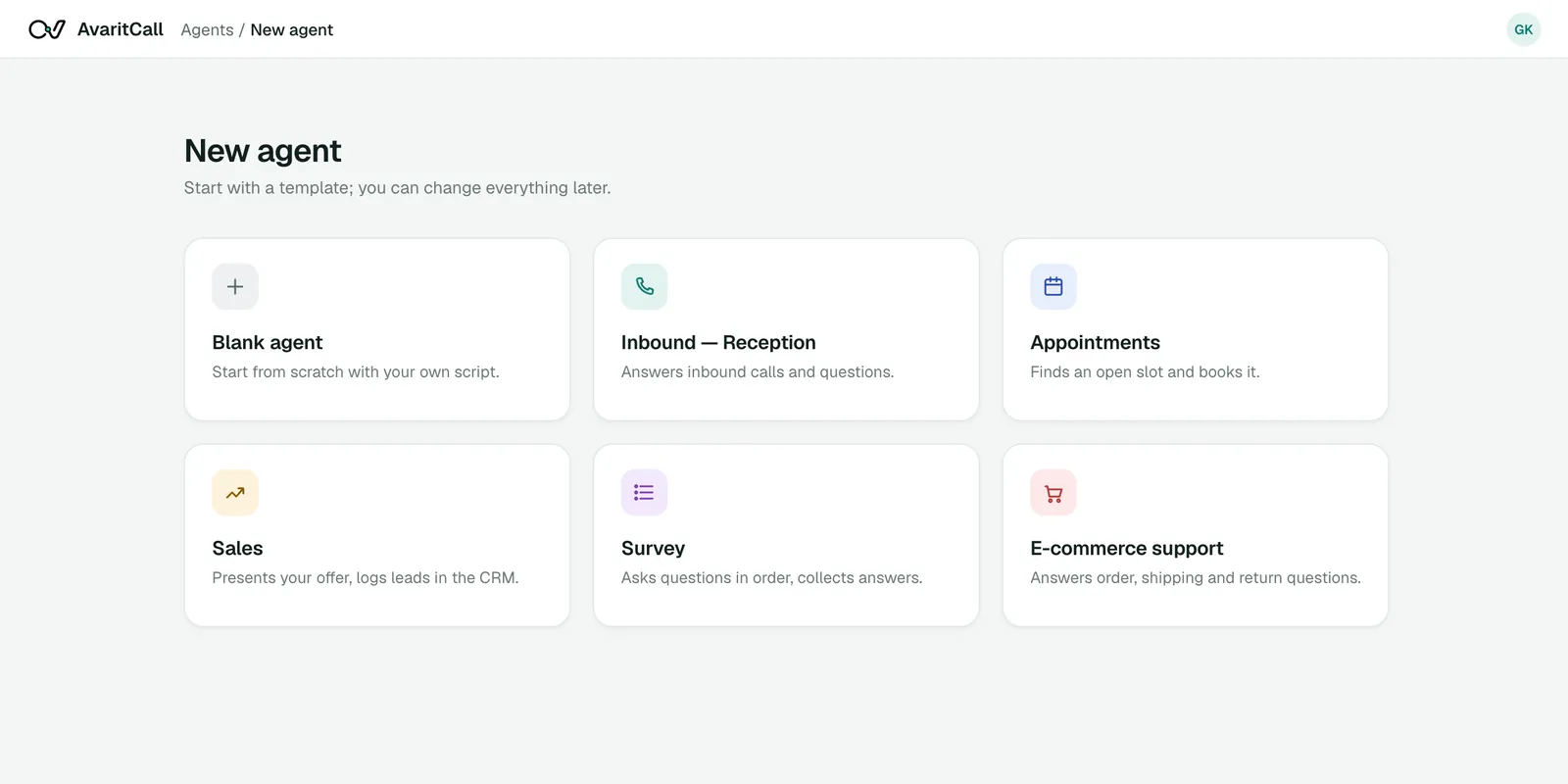
Build a Flow for Each Call Type
Program questions, application follow-ups and student support each get their own flow. For each one, choose the information the agent answers from, the verification it runs before any personal detail and when it transfers.
- Program pages and documents as the knowledge source
- Verification before any applicant or student record
- Transfer conditions for admissions, student services and billing
- Fields saved on each call
Deploy
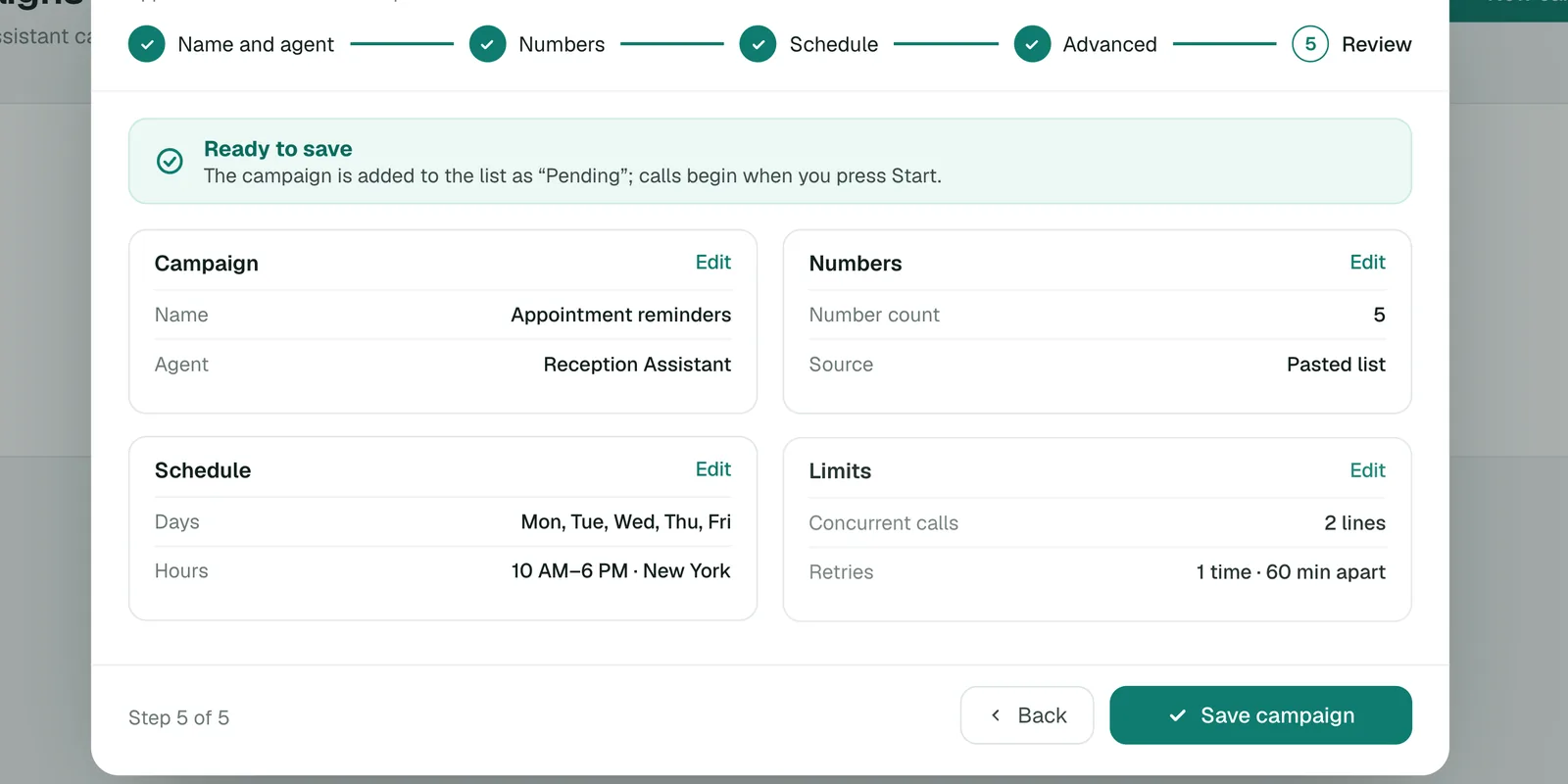
Run Inbound Lines and Outbound Campaigns
Connect your admissions line for incoming calls. For a missing-document campaign, set when calls go out and who stays off the list.
- Admissions line connected over SIP
- Calling days, hours and time zone
- A retry count from 0 to 5 and the gap between attempts
- People who ask not to be called are marked do-not-call automatically
Monitor
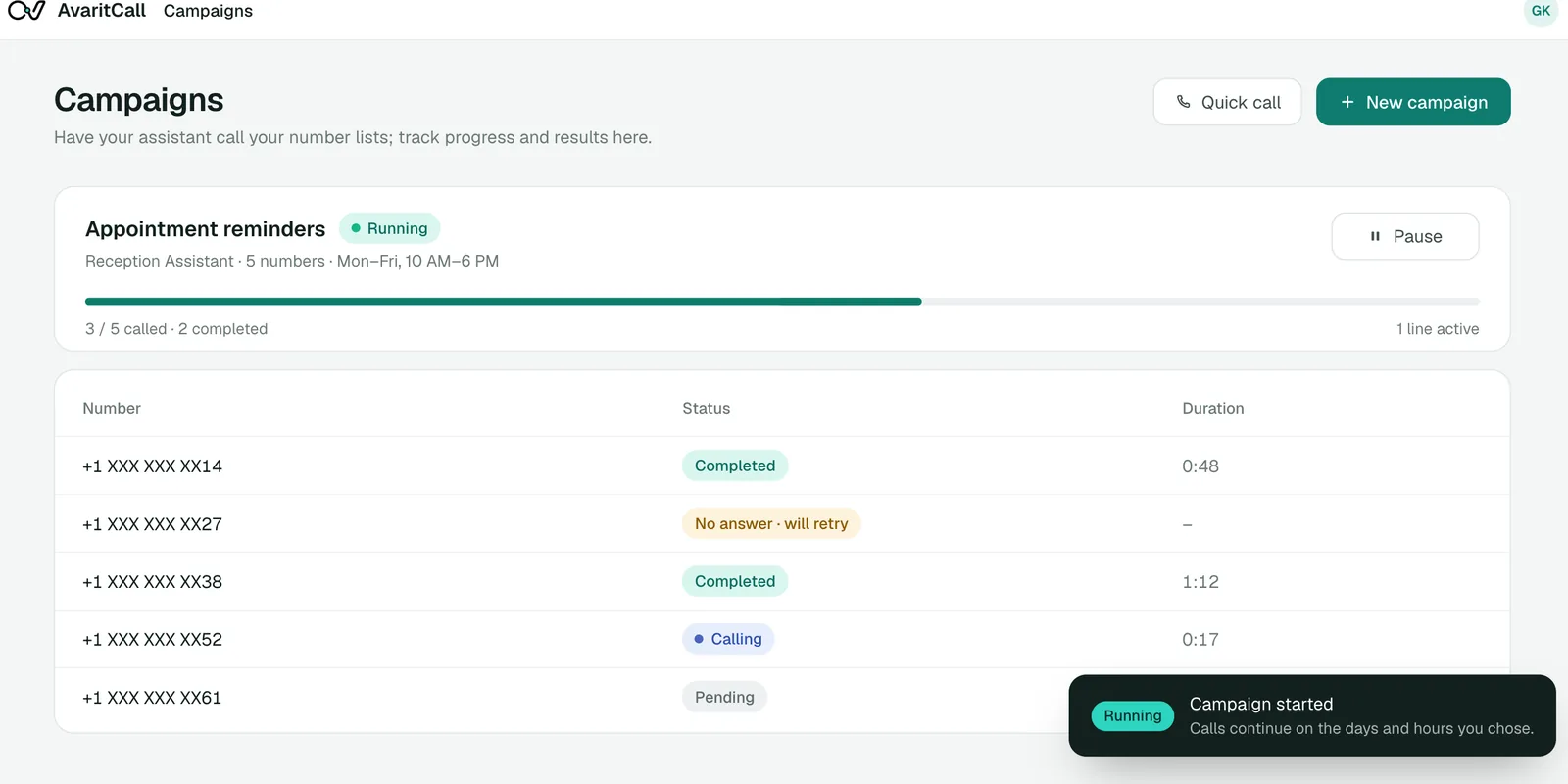
See Where Each Applicant Stands
Check the outcome of each call. A finished application or a recorded payment shows only when the related system can confirm it.
- Advisor calls booked
- Upload links sent
- Calls transferred to each team
- Pending callbacks
Protect Student Information and Route Calls to the Right Team
Verify the Caller Before Sharing Student Records
Public details like program dates and class times can be shared with any caller. Before anyone talks about an application status, a student record or a payment, your verification steps come first. When a parent or someone else calls, the agent follows your authorization rules. Only team members you give access to can see call records, and transcripts are deleted automatically after a set retention period. Anything beyond that is agreed in your setup and contract.
Give Admissions, Student Services, and Billing the Call Context
Document exceptions go to admissions, class access problems to student services and payment disputes to student accounts. If the team isn't free, a callback request is saved instead, with the reference, the caller's words and the target team.
Example handoff
Callback Requested
- Applicant ref.
- APP-30571
- Caller says
- The portal won't accept my transcript file
- Target team
- Admissions
- Transfer
- No answer, callback logged
Connect Your Admissions CRM, Student Systems, and Phone Lines
Each connection below says what it can do today. Student information systems connect through their API, and there's no ready-made connector for them.
Ready
Contact Lists
- Contact list upload
- AvaritCall CRM
Start your first campaign from a list with each applicant's contact details, application reference and the reason for the call.
Ready
Admissions CRM & Calendar
 Cal.com (beta)
- AvaritCall calendar
- AvaritCall CRM
- Webhooks
Advisor calls are booked in the AvaritCall calendar or Cal.com (beta), and call outcomes are saved in the AvaritCall CRM. Reading applicant records from another CRM, or writing outcomes back to it, goes through its API or webhooks.
Set up by our team
Student Information System & Billing
Reading live application status, missing documents or payment confirmations depends on what your system's API allows. Our team looks at each one for your setup.
Ready
Phone & Messaging
- Twilio
- Telnyx
- Plivo
- Any SIP trunk or PBX
Connect your existing line over SIP and transfer calls to each office. If your setup supports it, your official upload or payment link goes out by email or a WhatsApp template.
Choose Your First Student Call Workflow
Pick one flow to start, such as program questions or a missing-document campaign.
Add Program Information and Connect Your Data
Add your program pages and upload a contact list, or have our team look at your systems' APIs.
Set Calling, Verification, and Routing Rules
Choose calling hours, the verification questions and which office takes each kind of call.
Test Sample Calls and Launch
Play an applicant or a student in your browser, then go live.
| Connection | Read Application Status | Book an Advisor Call | Log Call Outcomes | Check Payment Status |
|---|---|---|---|---|
| Contact list upload | From the list fields | No | Yes, in the AvaritCall CRM | No |
| AvaritCall CRM and calendar (Cal.com in beta) | No | Yes | Yes | No |
| Custom API connection to your student or billing system | Depends on the API | No | Depends on the API | Depends on the API |
AI Agents for Education Pricing
You pay for talk minutes on the calls your agents answer and make. There are no plans with bundled minutes and no overage fees.
$0.08
per talk minute, billed per second
Example calculation
- 45-second call
- $0.06
- 2 min 30 s call
- $0.20
- 5-minute call
- $0.40
- Pay as you go, billed per second of talk time
- Ringing and unanswered calls are free
- Outbound campaigns run 5 concurrent calls per agent by default
- Emails and WhatsApp messages you choose to send are billed per message
- A custom connection to your student systems is scoped with you
Frequently Asked Questions
What can AI agents do for universities and education providers?
They answer admissions and student calls and make follow-up calls for you. Common jobs are program questions, advisor bookings, missing-document reminders, orientation reminders and tuition reminders, and anything that needs a person goes to the right office.
Can an AI agent answer program questions and book an admissions call?
Yes. Answers come from the program information you publish and approve. An advisor call booked in the AvaritCall calendar or Cal.com (beta) is created on the call, and the caller hears the confirmed time.
Can it follow up on incomplete applications and missing documents?
Yes. Upload a list of applicants with the missing step, and the agent calls before the deadline. It can send your official upload link, but the application counts as complete only when your application system shows the document.
Can it call students about orientation, missed classes, or re-enrollment?
Yes. Each of these can be its own campaign with its own list and script. Students who need help with a step get a callback request for the right team.
Can it remind students about tuition installments and check payment status?
It can remind them, and checking status needs a connection. The agent uses the balance and due date you share and saves any payment date the student gives. Payment status comes from your billing system once it's connected through its API.
How does AvaritCall verify a student or an authorized parent over the phone?
With the steps your institution sets. You choose the questions, such as a student ID and date of birth, and the authorization rules for parents or other callers. Until the caller passes them, the agent shares only public information.
When does a call go to admissions, student services, or billing?
When it matches the transfer conditions you set. Application exceptions usually go to admissions, class access problems to student services and payment questions to student accounts. If nobody answers, a callback request is saved with the details.
Can we connect our admissions CRM or student information system?
Yes, through their APIs. Outcomes can go out through webhooks, and our team scopes what a custom connection reads and writes. Until then, you can work from uploaded lists and the AvaritCall CRM.
How much do AI agents for education cost?
It's $0.08 per talk minute, billed per second, so a program call of 2 minutes 30 seconds costs $0.20. Messages you send are billed per message, and you start with $5 in credit with no card required. A custom connection to your student systems is scoped separately.
Start With Your Next Application Deadline
Pick the applicants with a deadline coming up and a document still missing, and start one campaign. Afterward, your admissions team can see who got the upload link, who booked an advisor call and who is waiting for a callback about the portal.